![[kaneko lab.]](https://www.kkaneko.jp/info/logo_png.png)
SQLite 3 でミリ秒付きの日時を扱う例
【概要】
SQLite 3でミリ秒を含む日時データを扱う方法を解説する。テーブル定義、レコード挿入、検索、UNIXタイムスタンプ形式での表示を具体例で示す。
【目次】
【サイト内の関連ページ】
1. 前準備
SQLite 3の基本情報は別ページ »にまとめている。
2. ミリ秒を含む日時データの扱い
SQLite 3の起動
本例では、インメモリデータベース(メモリ上だけに作られ、終了時に消える一時的なデータベース)を使用するため、データベース名を指定せずに起動する。
sqlite3現在の日時の取得
select datetime('now', 'localtime');
日時データを格納するテーブルの作成と初期データの挿入
create table R ( id integer primary key not null, created_at datetime);
insert into R values( 1, '2020-06-25 19:30:30.001' );
insert into R values( 2, '2020-06-25 19:30:30.002' );
insert into R values( 3, '2020-06-25 19:30:30.003' );
insert into R values( 4, '2020-06-25 19:30:31.001' );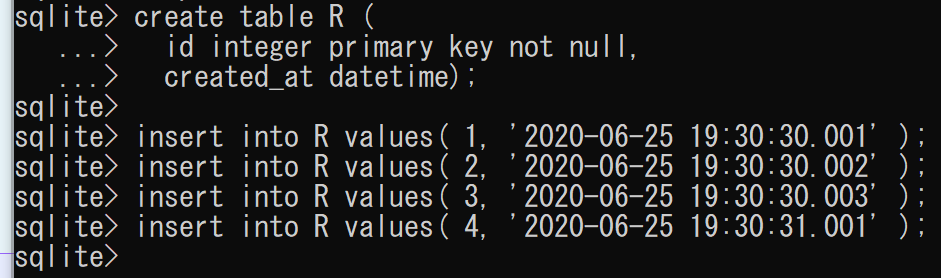
データ検索の例
select * from R;
select * from R where created_at < '2020-06-25 19:30:31.001';
select * from R where '2020-06-25 19:30:30.002' < created_at and created_at < '2020-06-25 19:30:31.001';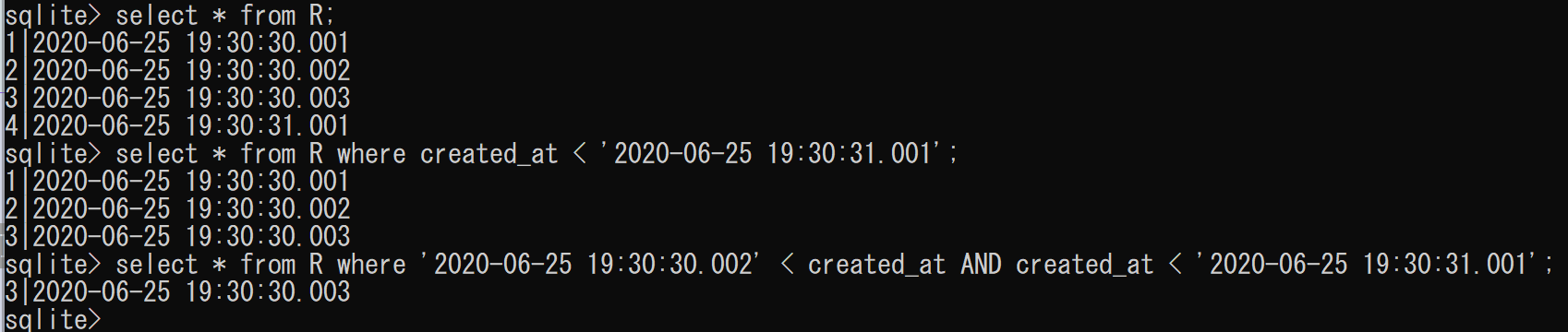
UNIXタイムスタンプ(ミリ秒付き)での表示
UNIXタイムスタンプ(1970年1月1日からの経過秒数)を、ミリ秒精度の小数付きで得るには、unixepoch関数にsubsec修飾子を付ける。
select unixepoch(created_at, 'subsec'), created_at from R;
SQLite 3の終了
.exit