![[kaneko lab.]](https://www.kkaneko.jp/info/logo_png.png)
ChatGPT の利用(文書の整形,文書の要約)(ChatGPT の API,Python を使用)(Windows 上)
【概要】
ChatGPTとPythonを使った文章の整形や要約の方法をWindowsで紹介している.特徴として,一度に処理できない長い文章の場合には分割処理し,結合して,最終的な結果を得るようにしている.具体的なプログラムの実行方法についても触れられている.文書整形プログラムarrange.py は,指定されたテキストファイルをOpenAIのChatGPT(gpt-5-mini)を使用して整形する.要約プログラム summary.py は,指定されたテキストファイルをOpenAIのChatGPT(gpt-5-mini)を使用して要約し,長さ500文字以下にする.いずれも,テキストが長い場合には分割して処理し,入力ファイルと出力ファイルをコマンドライン引数で指定する.いずれのプログラムも,実行には OpenAI のAPIキーが必要である.プログラムを実行する際に必要なPython開発環境やプログラムの保存方法,ファイル名の指定方法についても説明している.PythonプログラムはUbuntuでも動く.
【目次】
前準備
Python 3.12 のインストール
Pythonのインストールを行い、Pythonのプログラムを実行する環境を整える。扱う環境は、Windows搭載パソコンである。金子研究室では、Python 3.12.10を推奨する。
[Windows での Python 3.12 のインストール手順を見るには、ここをクリック]
Windows での Python 3.12 のインストール
以下のいずれかの方法でPython 3.12をインストールする。Pythonがインストール済みの場合、この手順は不要である。
方法 1:winget によるインストール
【インストールコマンドの実行方法】
管理者権限でコマンドプロンプトを起動する(手順:Windowsキーまたはスタートメニュー → cmd と入力 → 右クリック → 「管理者として実行」)。そして、コマンド全体をコマンドプロンプトにコピー&ペーストする。
--scope machine を指定することで、システム全体(全ユーザー向け)にインストールされる。このオプションの実行には管理者権限が必要である。インストール完了後、コマンドプロンプトを再起動するとPATHが反映される。
REM Python 3.12 をシステム領域にインストール
winget install --id Python.Python.3.12 -e --scope machine --silent --accept-source-agreements --accept-package-agreements --override "/quiet InstallAllUsers=1 PrependPath=1 Include_test=0 Include_pip=1 Include_launcher=1 InstallLauncherAllUsers=1 TargetDir=\"C:\Program Files\Python312\""
if not "%ERRORLEVEL%"=="0" ( color 0c & echo Python 3.12 のインストールに失敗しました & ping 127.0.0.1 -n 6 >nul & color )

REM Python と Scripts を PATH 先頭に追加
powershell -NoProfile -Command "$p='C:\Program Files\Python312'; $s=\"$p\Scripts\"; if(Test-Path $p){$k=[Microsoft.Win32.Registry]::LocalMachine.OpenSubKey('SYSTEM\CurrentControlSet\Control\Session Manager\Environment',$true); $c=$k.GetValue('Path','',[Microsoft.Win32.RegistryValueOptions]::DoNotExpandEnvironmentNames); $t=$k.GetValueKind('Path'); $new=$c; if((';'+$new+';') -notlike \"*;$p;*\"){$new=$p+';'+$new}; if((';'+$new+';') -notlike \"*;$s;*\"){$new=$s+';'+$new}; if($new -ne $c){$k.SetValue('Path',$new,$t)}; $k.Close()}"

REM 現在のセッションにも反映(システムPATHを再取得して連結)
for /f "usebackq tokens=2,*" %A in (`reg query "HKLM\SYSTEM\CurrentControlSet\Control\Session Manager\Environment" /v Path`) do set "PATH=%B"

REM pip / wheel の更新
python -m pip install --no-user -U pip wheel
if not "%ERRORLEVEL%"=="0" ( color 0c & echo pip / wheel の更新に失敗しました & ping 127.0.0.1 -n 6 >nul & color )
方法 2:インストーラーによるインストール
- Python公式サイト(https://www.python.org/downloads/)にアクセスし、「Download Python 3.x.x」ボタンからWindows用インストーラーをダウンロードする。
- ダウンロードしたインストーラーを実行する。
- 初期画面の下部に表示される「Add python.exe to PATH」にチェックを入れてから「Customize installation」を選択する。このチェックを入れ忘れると、コマンドプロンプトから
pythonコマンドを実行できない。 - 「Install Python 3.xx for all users」にチェックを入れ、「Install」をクリックする。
インストールの確認
コマンドプロンプトで以下を実行する。
python --versionバージョン番号(例:Python 3.12.x)が表示されればインストール成功である。「'python' は、内部コマンドまたは外部コマンドとして認識されていません。」と表示される場合は、インストールが正常に完了していない。
Python の開発環境 Visual Studio Code のインストールと Python 用の設定
Python の開発環境Visual Studio Code(プログラムを編集するソフトウェア。以下、VS Code)を整える。
[Windows での Visual Studio Code のインストールと Python 用の設定手順を見るには、ここをクリック]
Windows での Visual Studio Code のインストールと Python 用の設定手順
1. VS Code と拡張機能のインストール
以下のコマンドにより,既存の VS Code を削除し,全ユーザー共有の設定で再インストールしたうえで,拡張機能(VS Code に機能を追加するソフトウェア)をまとめて導入する.
【インストールコマンドの実行方法】
管理者権限でコマンドプロンプトを起動する(手順:Windows キーまたはスタートメニュー → cmd と入力 → 右クリック → 「管理者として実行」)。そして,コマンド全体をコマンドプロンプトにコピー&ペーストする。
インストールコマンド
REM ============================================================
REM Microsoft Visual Studio Code
REM ============================================================
REM Build Tools + Desktop development with C++(VCTools)+ 追加コンポーネント(一括)
REM 未インストール時: winget で新規インストール
REM インストール済み時: setup.exe modify でコンポーネント追加(バージョンは変更しない)
winget list --id Microsoft.VisualStudio.BuildTools 2>nul | findstr /i "BuildTools" >nul 2>&1
if %ERRORLEVEL% EQU 0 (
    for /f "usebackq delims=" %P in (`"C:\Program Files (x86)\Microsoft Visual Studio\Installer\vswhere.exe" -products Microsoft.VisualStudio.Product.BuildTools -property installationPath`) do start /wait "" "C:\Program Files (x86)\Microsoft Visual Studio\Installer\setup.exe" modify --installPath "%P" --add Microsoft.VisualStudio.Workload.VCTools --add Microsoft.VisualStudio.Workload.MSBuildTools --add Microsoft.VisualStudio.Component.VC.CMake.Project --add Microsoft.VisualStudio.Component.VC.Llvm.Clang --add Microsoft.VisualStudio.Component.VC.Llvm.ClangToolset --add Microsoft.VisualStudio.Component.Windows11SDK.26100 --add Microsoft.VisualStudio.Component.VC.v143.x86.x64 --includeRecommended --quiet --norestart --nocache
    if not "%ERRORLEVEL%"=="0" ( color 0c & echo Build Tools のコンポーネント追加に失敗しました & ping 127.0.0.1 -n 6 >nul & color )
) else (
    winget install --scope machine --id Microsoft.VisualStudio.BuildTools -e --silent --disable-interactivity --force --accept-source-agreements --accept-package-agreements --override "--quiet --wait --norestart --nocache --add Microsoft.VisualStudio.Workload.VCTools --includeRecommended --add Microsoft.VisualStudio.Workload.MSBuildTools --add Microsoft.VisualStudio.Component.VC.CMake.Project --add Microsoft.VisualStudio.Component.VC.Llvm.Clang --add Microsoft.VisualStudio.Component.VC.Llvm.ClangToolset --add Microsoft.VisualStudio.Component.Windows11SDK.26100 --add Microsoft.VisualStudio.Component.VC.v143.x86.x64"
    if not "%ERRORLEVEL%"=="0" ( color 0c & echo Build Tools のインストールに失敗しました & ping 127.0.0.1 -n 6 >nul & color )
)

REM 全ユーザー共有の拡張機能フォルダ
if not exist "C:\ProgramData\vscode-extensions" mkdir "C:\ProgramData\vscode-extensions"
icacls "C:\ProgramData\vscode-extensions" /grant "Everyone:(OI)(CI)M" /T

REM スタートメニューのショートカットを --extensions-dir 付きで再作成
if exist "C:\ProgramData\Microsoft\Windows\Start Menu\Programs\Visual Studio Code" rmdir /s /q "C:\ProgramData\Microsoft\Windows\Start Menu\Programs\Visual Studio Code"
if exist "C:\ProgramData\Microsoft\Windows\Start Menu\Programs\Visual Studio Code.lnk" del "C:\ProgramData\Microsoft\Windows\Start Menu\Programs\Visual Studio Code.lnk"
powershell -NoProfile -Command "$s=New-Object -ComObject WScript.Shell; $lnk=$s.CreateShortcut('C:\ProgramData\Microsoft\Windows\Start Menu\Programs\Visual Studio Code.lnk'); $lnk.TargetPath='C:\Program Files\Microsoft VS Code\Code.exe'; $lnk.Arguments='--extensions-dir \"C:\ProgramData\vscode-extensions\"'; $lnk.Save()"
REM ショートカットの検証
powershell -NoProfile -Command "$s=New-Object -ComObject WScript.Shell; $lnk=$s.CreateShortcut('C:\ProgramData\Microsoft\Windows\Start Menu\Programs\Visual Studio Code.lnk'); Write-Host 'TargetPath:' $lnk.TargetPath; Write-Host 'Arguments:' $lnk.Arguments"

REM ファイル / フォルダ右クリックの「Code で開く」を登録
reg add "HKLM\SOFTWARE\Classes\*\shell\VSCode\command" /ve /d "\"C:\Program Files\Microsoft VS Code\Code.exe\" --extensions-dir \"C:\ProgramData\vscode-extensions\" \"%1\"" /f
reg add "HKLM\SOFTWARE\Classes\Directory\shell\VSCode\command" /ve /d "\"C:\Program Files\Microsoft VS Code\Code.exe\" --extensions-dir \"C:\ProgramData\vscode-extensions\" \"%1\"" /f
reg add "HKLM\SOFTWARE\Classes\Directory\Background\shell\VSCode\command" /ve /d "\"C:\Program Files\Microsoft VS Code\Code.exe\" --extensions-dir \"C:\ProgramData\vscode-extensions\" \"%V\"" /f

REM --extensions-dir 付きで起動する code.cmd ラッパを作成
REM (%* を echo で書くと対話的 cmd で失われるため、PowerShell で [char]37+'*' を書き出す)
powershell -NoProfile -Command "$pct=[char]37; $q=[char]34; $c='@echo off'+[char]13+[char]10+$q+'C:\Program Files\Microsoft VS Code\bin\code.cmd'+$q+' --extensions-dir '+$q+'C:\ProgramData\vscode-extensions'+$q+' '+$pct+'*'+[char]13+[char]10; [IO.File]::WriteAllText('C:\ProgramData\vscode-extensions\vscode.cmd',$c,[Text.Encoding]::ASCII)"

REM 拡張機能のインストール
set "CODE=C:\Program Files\Microsoft VS Code\bin\code.cmd"
"%CODE%" --extensions-dir "C:\ProgramData\vscode-extensions" --uninstall-extension GitHub.copilot
"%CODE%" --extensions-dir "C:\ProgramData\vscode-extensions" --uninstall-extension GitHub.copilot-chat
"%CODE%" --extensions-dir "C:\ProgramData\vscode-extensions" --install-extension ms-python.python
"%CODE%" --extensions-dir "C:\ProgramData\vscode-extensions" --install-extension ms-python.vscode-pylance
"%CODE%" --extensions-dir "C:\ProgramData\vscode-extensions" --install-extension ms-python.debugpy
"%CODE%" --extensions-dir "C:\ProgramData\vscode-extensions" --install-extension MS-CEINTL.vscode-language-pack-ja
"%CODE%" --extensions-dir "C:\ProgramData\vscode-extensions" --install-extension saoudrizwan.claude-dev
"%CODE%" --extensions-dir "C:\ProgramData\vscode-extensions" --install-extension rust-lang.rust-analyzer
"%CODE%" --extensions-dir "C:\ProgramData\vscode-extensions" --install-extension tamasfe.even-better-toml
"%CODE%" --extensions-dir "C:\ProgramData\vscode-extensions" --install-extension anthropic.claude-code
"%CODE%" --extensions-dir "C:\ProgramData\vscode-extensions" --install-extension almenon.arepl
"%CODE%" --extensions-dir "C:\ProgramData\vscode-extensions" --list-extensions --show-versions

REM settings.json を作成(自動更新オフ、Python、Claude Code 設定)
if not exist "%APPDATA%\Code\User" mkdir "%APPDATA%\Code\User"
python -c "import json,os;data={'update.mode':'none','update.enableWindowsBackgroundUpdates':False,'extensions.autoUpdate':False,'python.defaultInterpreterPath':r'C:\Program Files\Python312\python.exe','claudeCode.environmentVariables':[{'name':'ANTHROPIC_API_KEY','value':'not-needed'},{'name':'ANTHROPIC_AUTH_TOKEN','value':'ollama'},{'name':'ANTHROPIC_BASE_URL','value':'http://localhost:11434'},{'name':'ANTHROPIC_MODEL','value':'glm-4.7-flash'},{'name':'CLAUDE_CODE_DISABLE_NONESSENTIAL_TRAFFIC','value':'1'}]};p=os.path.join(os.environ['APPDATA'],'Code','User','settings.json');open(p,'w',encoding='utf-8').write(json.dumps(data,indent=4));print('Done:',p)"

REM 自動更新の抑止ポリシー(settings.json に加えて、レジストリ側でも明示的にオフ)
reg add "HKLM\SOFTWARE\Policies\Microsoft\VSCode" /v "UpdateMode" /t REG_SZ /d "none" /f
echo === セットアップ完了 ===
2. Python インタプリタの選択
同一マシンに複数の Python がインストールされている場合,VS Code で使用する Python 本体(インタプリタ:Python プログラムを解釈・実行するソフトウェア)を選択する必要がある.
- コマンドパレット(コマンド名で機能を呼び出す VS Code の入力欄)を開く(
Ctrl+Shift+P) Python: Select Interpreterと入力する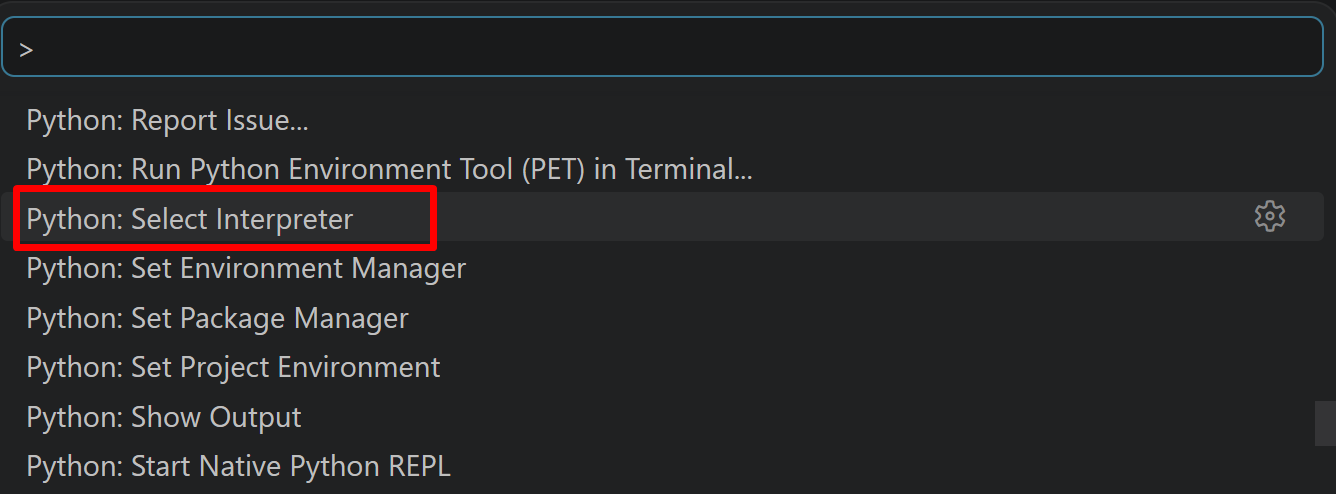
- 表示される一覧から,使用する Python(例:
C:\Program Files\Python312\python.exe)を選択する.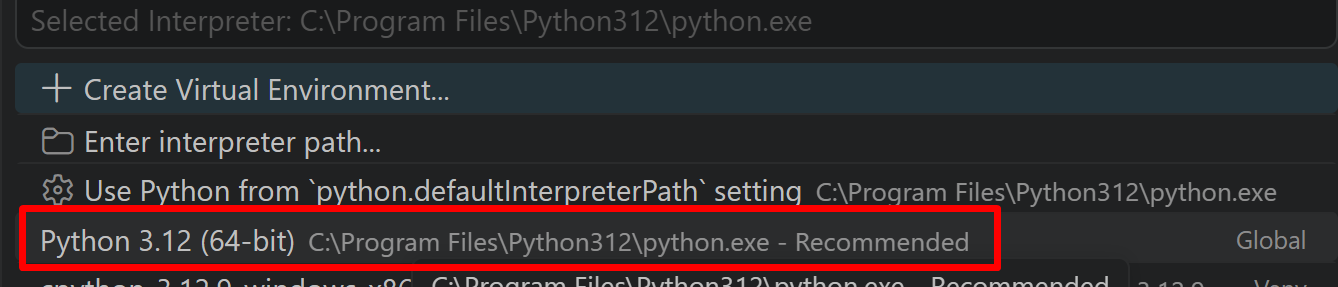
- 必要なPythonライブラリのインストール
【関連する外部ページ】
【サイト内の関連情報】
文書の整形プログラム(ChatGPT API,Python を使用)
ChatGPT にプロンプトを与えることにより, 日本語の文書を整形して,最終結果をファイルに保存する. HTMLファイルやPDFやパワーポイントなどから抜き出して得られる書式が乱れた文書を整える用途を想定. 指定したファイルの中身が長いときには,分割して,ChatGPT で処理を行う. このプログラムの利用では,OpenAI の APIキーが必要である.
- OpenAI の APIキーを準備する
【関連する外部ページ】
- OpenAI の API キーのページ
- 料金の条件や利用履歴はこちらで確認.
- Windows で,コマンドプロンプトを実行
- エディタを起動
cd /d c:%HOMEPATH% notepad arrange.py - エディタで,次のプログラムを保存
''' ChatGPT に「次の日本語の文章を整えてください.」のプロンプトを与えることにより, 整形して,最終結果をファイルに保存する. 指定したファイルの中身が長いときには,分割して,ChatGPT で処理を行う. このプログラムの利用では,APIキーが必要である. [利用法] python arrange.py --input input.txt --output output.txt --api_key your_api_key ''' import argparse from openai import OpenAI import sys import textwrap import time MAX_CHUNK_LENGTH = 1500 DEBUG_PRINT = False def get_arguments(): parser = argparse.ArgumentParser(description='ChatGPT Text Refinement.') parser.add_argument('--input', type=str, required=True, help='Input file path') parser.add_argument('--output', type=str, required=True, help='Output file path') parser.add_argument('--api_key', type=str, required=True, help='OpenAI API Key') parser.add_argument('--remove_url_and_source_code', type=bool, default=False, help='Remove URL and source code from text') parser.add_argument('--model', type=str, default="gpt-5-mini", help='GPT model') args = parser.parse_args() return args def send_messages(client, model, content, chunk): messages = [ {"role": "system", "content": content}, {"role": "user", "content": chunk} ] if DEBUG_PRINT: print("----------------------------------------------------") print(messages) try: # APIにリクエスト response = client.chat.completions.create( model=model, messages=messages, ) except Exception as e: print(f"Failed to send request to OpenAI API: {str(e)}") sys.exit(1) return response.choices[0].message.content def handle_chunk(client, model, content, current_chunk): results = [] # テキストの長さが長すぎる場合、その位置で分割 chunks = textwrap.wrap( current_chunk, width=MAX_CHUNK_LENGTH, break_long_words=True) for chunk in chunks: # APIにリクエスト response = send_messages(client, model, content, chunk) if DEBUG_PRINT: print("----------------------------------------------------") print("response,", response) # レスポンスをリストに追加 results.append(response) # APIのレート制限.1分間に40kトークン以下、1分間に200以下リクエストを目指したい time.sleep(20) return results def request(client, model, content, text): sentences = text.split("\n") results = [] current_chunk = "" for sentence in sentences: # 一定の長さに達するまで文章を追加 if len(current_chunk) + len(sentence) < (MAX_CHUNK_LENGTH - 100): current_chunk += sentence + "\n" else: if len(current_chunk) > 0: results += handle_chunk(client, model, content, current_chunk) # 現在のチャンクをリセット.次の文を設定 current_chunk = sentence + "\n" # 最終チャンクの処理 if current_chunk: results += handle_chunk(client, model, content, current_chunk) if DEBUG_PRINT: print("----------------------------------------------------") print("results,", results) # 結合して最終的な結果を作成 final_result = "\n".join(results) return final_result def main(): args = get_arguments() # OpenAIのAPIキーを設定 client = OpenAI(api_key=args.api_key) # ファイル名は,コマンドライン引数 filename = args.input output_filename = args.output # コマンドライン引数から remove_url_and_source_code の値を取得 remove_url_and_source_code = args.remove_url_and_source_code # コマンドライン引数から使用する GPT モデル名を取得 model = args.model try: with open(filename, 'r', encoding='utf-8') as file: text = file.read() except FileNotFoundError: print(f"The file {filename} was not found.") sys.exit(1) if remove_url_and_source_code: prompt = "Please examine the provided Japanese text, and enhance its format by correcting any grammar, spelling, syntax, and punctuation errors, while maintaining the original meaning. If you identify any clear redundancies or disorganized sections, restructure them to improve readability, while ensuring the original intent remains intact. Please exclude any source code and URL in the output. Do not translate or predict subsequent sentences. The output should be in Japanese." else: prompt = "Please examine the provided Japanese text, and enhance its format by correcting any grammar, spelling, syntax, and punctuation errors, while maintaining the original meaning. If you identify any clear redundancies or disorganized sections, restructure them to improve readability, while ensuring the original intent remains intact. Do not translate or predict subsequent sentences. The output should be in Japanese." final_result = request( client, model, prompt, text) try: # 結果をファイルに書き込む with open(output_filename, 'w', encoding='utf-8') as output_file: output_file.write(final_result) print("\033[32m結果が保存されました.入力ファイル名は", filename, "出力ファイル名は", output_filename, "\033[0m") except IOError as e: print("\033[31mファイルへの書き込みに失敗しました.エラー内容:", str(e), "\033[0m") sys.exit(1) if __name__ == "__main__": main() - Python プログラムの実行
プログラムを arrange.pyのようなファイル名で保存したので, 「python arrange.py」のようなコマンドで行う.
input.txt のところには処理したいファイル名を指定すること.
output.txt のところには結果を保存したいファイル名を指定すること.
your_api_key のところには OpenAI の API キーを指定すること.
もし,ソースコードおよび URL を取り除いて処理したいときは「--remove_url_and_source_code 1」を付けることができる.
既定(デフォルト)のモデルは,「gpt-5-mini」である. もしモデルを変更したいときは,「--model <モデル名>」のように指定できる.
python arrange.py --input input.txt --output output.txt --api_key your_api_key
- 結果の確認
- 処理前のテキストファイルの先頭部分
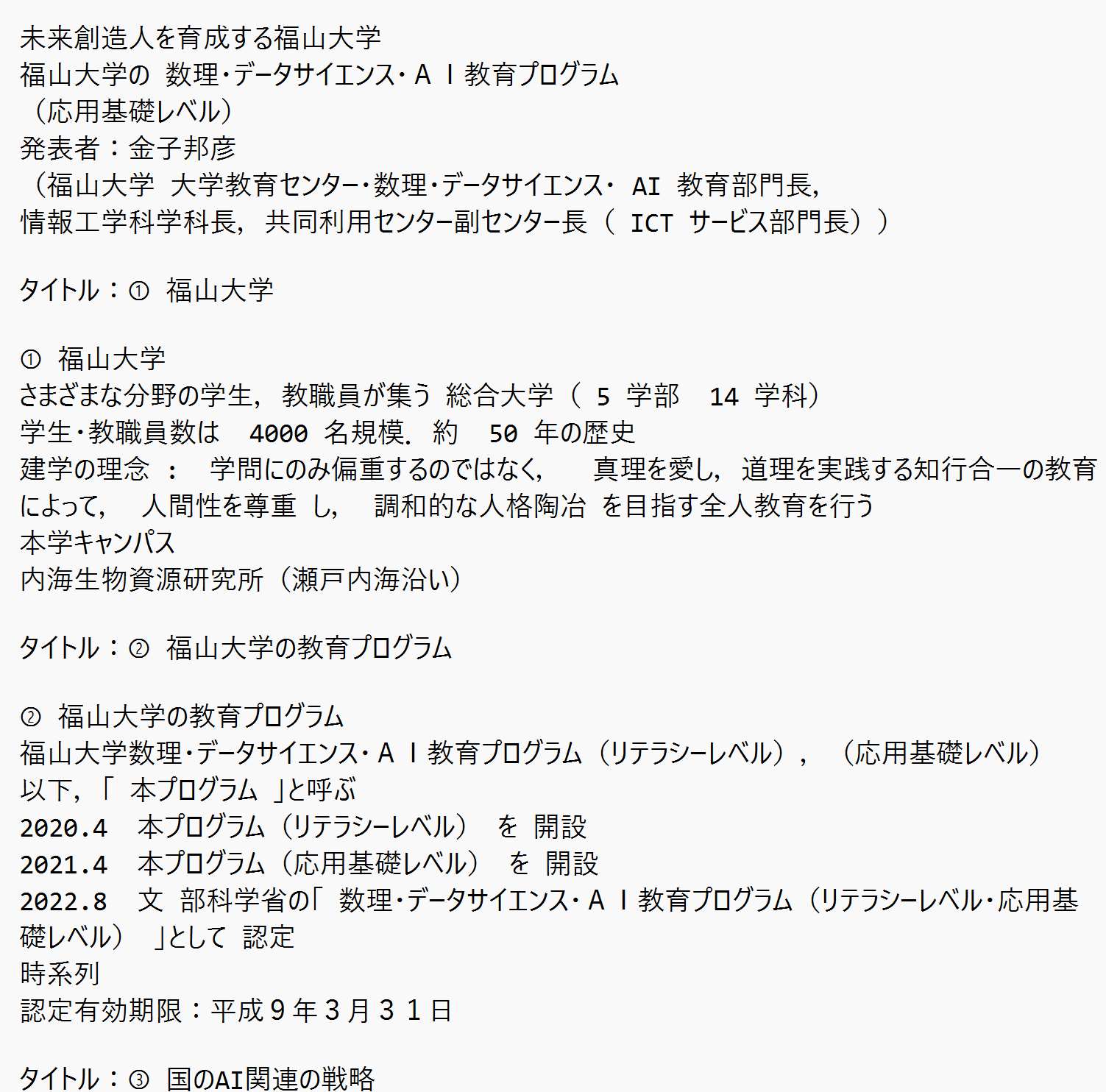
(以下省略) - 処理結果のテキストファイルの先頭部分
処理結果では,文章として整うように整形される.
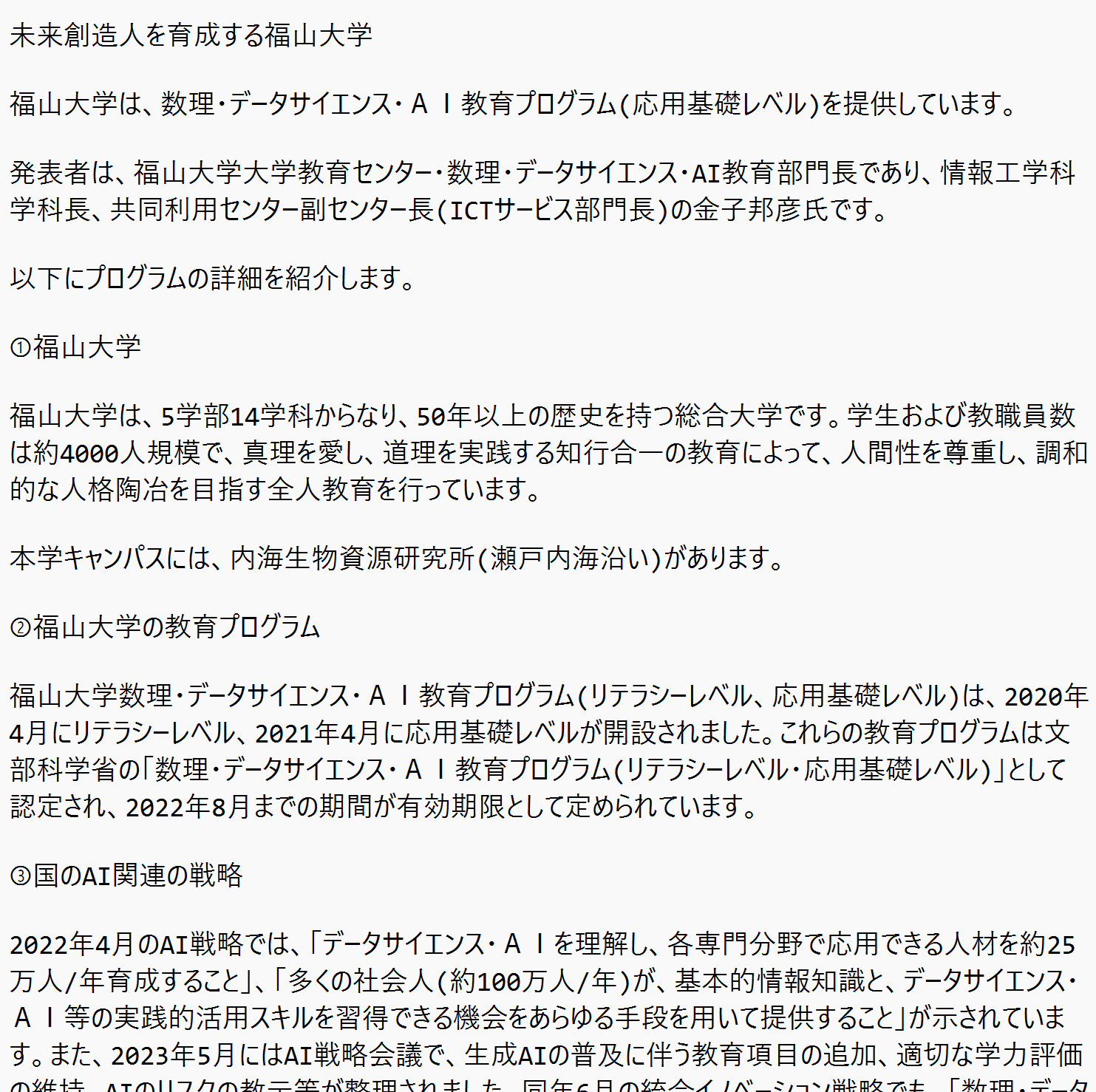
(以下省略)
- 処理前のテキストファイルの先頭部分
文書の要約プログラム(ChatGPT API,Python を使用)
指定したテキストファイルを読み込み, ChatGPT にプロンプトを与えることにより,要約して,最終結果をファイルに保存する.指定したファイルの中身が長いときには,分割して,ChatGPT で処理を行い,処理結果を結合するようにしている. 要約した結果が長いときは,要約を繰り返す.
- OpenAI の API キーを準備しておく
OpenAI の API キーのページ
https://platform.openai.com/api-keys
料金の条件や利用履歴はこちらで確認.
- Windows で,コマンドプロンプトを実行
- エディタを起動
cd /d c:%HOMEPATH% notepad summary.py - エディタで,次のプログラムを保存
''' 指定したテキストファイルを読み込み, ChatGPT にプロンプトを与えることにより,要約して,最終結果をファイルに保存する.指定したファイルの中身が長いときには,分割して,ChatGPT で処理を行い,処理結果を結合するようにしている. 要約した結果が長いときは,要約を繰り返す. [利用法] python summary.py --input input.txt --output output.txt --api_key your_api_key ''' import argparse from openai import OpenAI import sys import textwrap import time MAX_CHUNK_LENGTH = 1500 DEBUG_PRINT = False CHARACTERS = 500 def get_arguments(): parser = argparse.ArgumentParser(description='ChatGPT Text Refinement.') parser.add_argument('--input', type=str, required=True, help='Input file path') parser.add_argument('--output', type=str, required=True, help='Output file path') parser.add_argument('--api_key', type=str, required=True, help='OpenAI API Key') parser.add_argument('--remove_url_and_source_code', type=bool, default=False, help='Remove URL and source code from text') parser.add_argument('--model', type=str, default="gpt-5-mini", help='GPT model') args = parser.parse_args() return args def send_messages(client, model, content, chunk): messages = [ {"role": "system", "content": content}, {"role": "user", "content": chunk} ] if DEBUG_PRINT: print("----------------------------------------------------") print(messages) try: # APIにリクエスト response = client.chat.completions.create( model=model, messages=messages, ) except Exception as e: print(f"Failed to send request to OpenAI API: {str(e)}") sys.exit(1) return response.choices[0].message.content def handle_chunk(client, model, content, current_chunk): results = [] # テキストの長さが長すぎる場合、その位置で分割 chunks = textwrap.wrap( current_chunk, width=MAX_CHUNK_LENGTH, break_long_words=True) for chunk in chunks: # APIにリクエスト response = send_messages(client, model, content, chunk) if DEBUG_PRINT: print("----------------------------------------------------") print("response,", response) # レスポンスをリストに追加 results.append(response) # APIのレート制限.1分間に40kトークン以下、1分間に200以下リクエストを目指したい time.sleep(20) return results def request(client, model, content, text): sentences = text.split("\n") results = [] current_chunk = "" for sentence in sentences: # 一定の長さに達するまで文章を追加 if len(current_chunk) + len(sentence) < (MAX_CHUNK_LENGTH - 100): current_chunk += sentence + "\n" else: if len(current_chunk) > 0: results += handle_chunk(client, model, content, current_chunk) # 現在のチャンクをリセット.次の文を設定 current_chunk = sentence + "\n" # 最終チャンクの処理 if current_chunk: results += handle_chunk(client, model, content, current_chunk) if DEBUG_PRINT: print("----------------------------------------------------") print("results,", results) # 結合して最終的な結果を作成 final_result = "\n".join(results) return final_result def main(): args = get_arguments() # OpenAIのAPIキーを設定 client = OpenAI(api_key=args.api_key) # ファイル名は,コマンドライン引数 filename = args.input output_filename = args.output # コマンドライン引数から remove_url_and_source_code の値を取得 remove_url_and_source_code = args.remove_url_and_source_code # コマンドライン引数から使用する GPT モデル名を取得 model = args.model try: with open(filename, 'r', encoding='utf-8') as file: text = file.read() except FileNotFoundError: print(f"The file {filename} was not found.") sys.exit(1) prompt1 = "Please provide a summary of the supplied Japanese text, excluding any source code and URL. Do not translate or predict any future sentences. The output should be a single paragraph and it should be in Japanese." prompt2 = "Please provide a summary of the supplied Japanese text. Do not translate or predict any future sentences. The output should be a single paragraph and it should be in Japanese." if remove_url_and_source_code: prompt = prompt1 else: prompt = prompt2 final_result = request( client, model, prompt, text) if DEBUG_PRINT: print("----------------------------------------------------") print("final_result,", final_result) while(len(final_result) > CHARACTERS): # 長いので、もう一度要約する。 text = final_result final_result = request( client, model, prompt, text) if DEBUG_PRINT: print("----------------------------------------------------") print("final_result,", final_result) # 全体を整えるように ChatGPT に頼む text = final_result final_result = request( client, model, "As a professional proofreader, your task is to refine and correct the provided Japanese text while preserving its original meaning. The refined output should not translate or predict any future sentences, and it should be consolidated into a single paragraph. Importantly, the output must remain in Japanese and not exceed " + str(CHARACTERS) + " characters.", text) if DEBUG_PRINT: print("----------------------------------------------------") print("final_result,", final_result) try: # 結果をファイルに書き込む with open(output_filename, 'w', encoding='utf-8') as output_file: output_file.write(final_result.replace('\r', '').replace('\n', '')) print("\033[32m結果が保存されました.入力ファイル名は", filename, "出力ファイル名は", output_filename, "\033[0m") except IOError as e: print("\033[31mファイルへの書き込みに失敗しました.エラー内容:", str(e), "\033[0m") sys.exit(1) if __name__ == "__main__": main() - Python プログラムの実行
プログラムを summary.pyのようなファイル名で保存したので, 「python summary.py」のようなコマンドで行う.
output.txt のところには処理したいファイル名を指定すること.
summary.txt のところには結果を保存したいファイル名を指定すること.
your_api_key のところには OpenAI の API キーを指定すること.
もし,ソースコードおよび URL を取り除いて処理したいときは「--remove_url_and_source_code 1」を付けることができる.
既定(デフォルト)のモデルは,「gpt-5-mini」である. もしモデルを変更したいときは,「--model <モデル名>」のように指定できる.
python summary.py --input output.txt --output summary.txt --api_key your_api_key - 結果の確認
- 処理前のテキストファイルの先頭部分
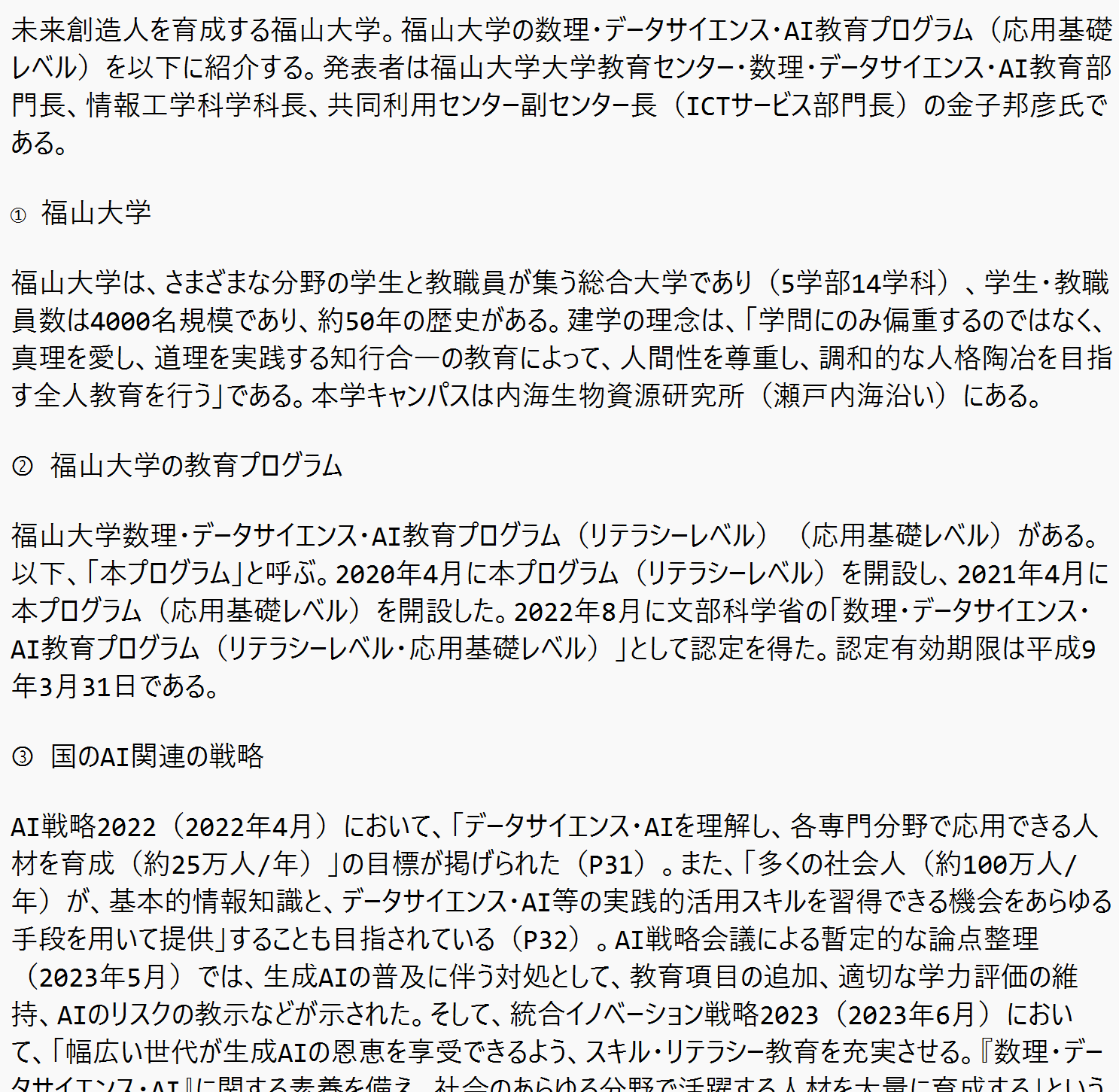
(以下省略) - 処理結果のテキストファイル
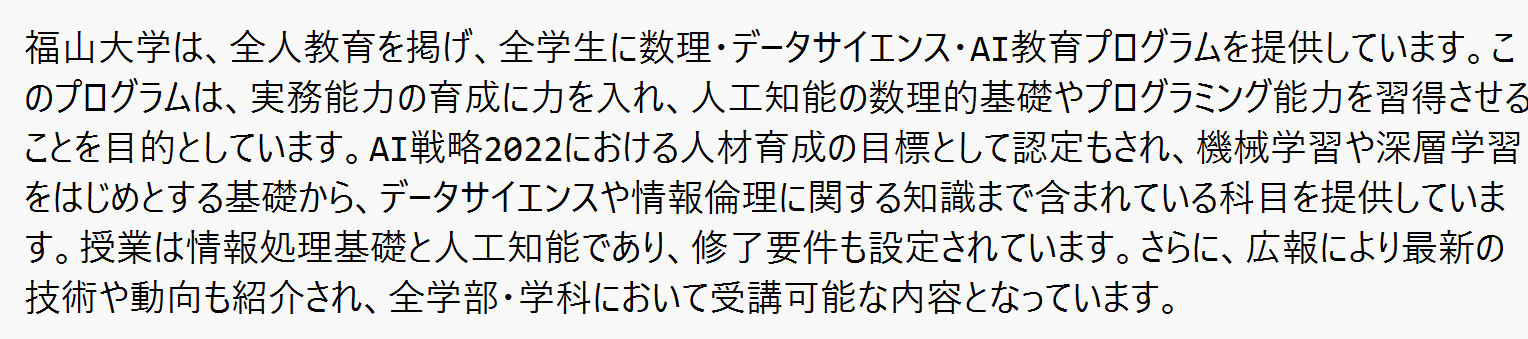
処理結果では要約される.文字数は「CHARACTERS = 500」で調整してください.
- 処理前のテキストファイルの先頭部分