![[kaneko lab.]](https://www.kkaneko.jp/info/logo_png.png)
Ultralytics ReID統合版によるマルチオブジェクトトラッキング(ソースコードと実行結果)
【概要】
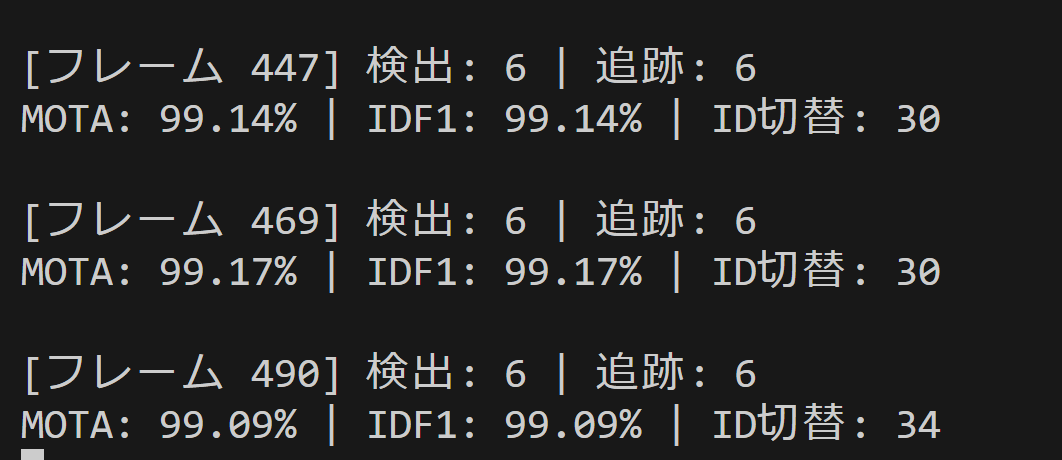
Ultralytics YOLO26とBoT-SORTを使用し、外観特徴(ReID)による再識別を組み合わせたマルチオブジェクトトラッキングシステムである。遮蔽で一時的に見失った物体を外観特徴で再びひも付け、MOTA・IDF1などのMOT評価指標をリアルタイムに算出する。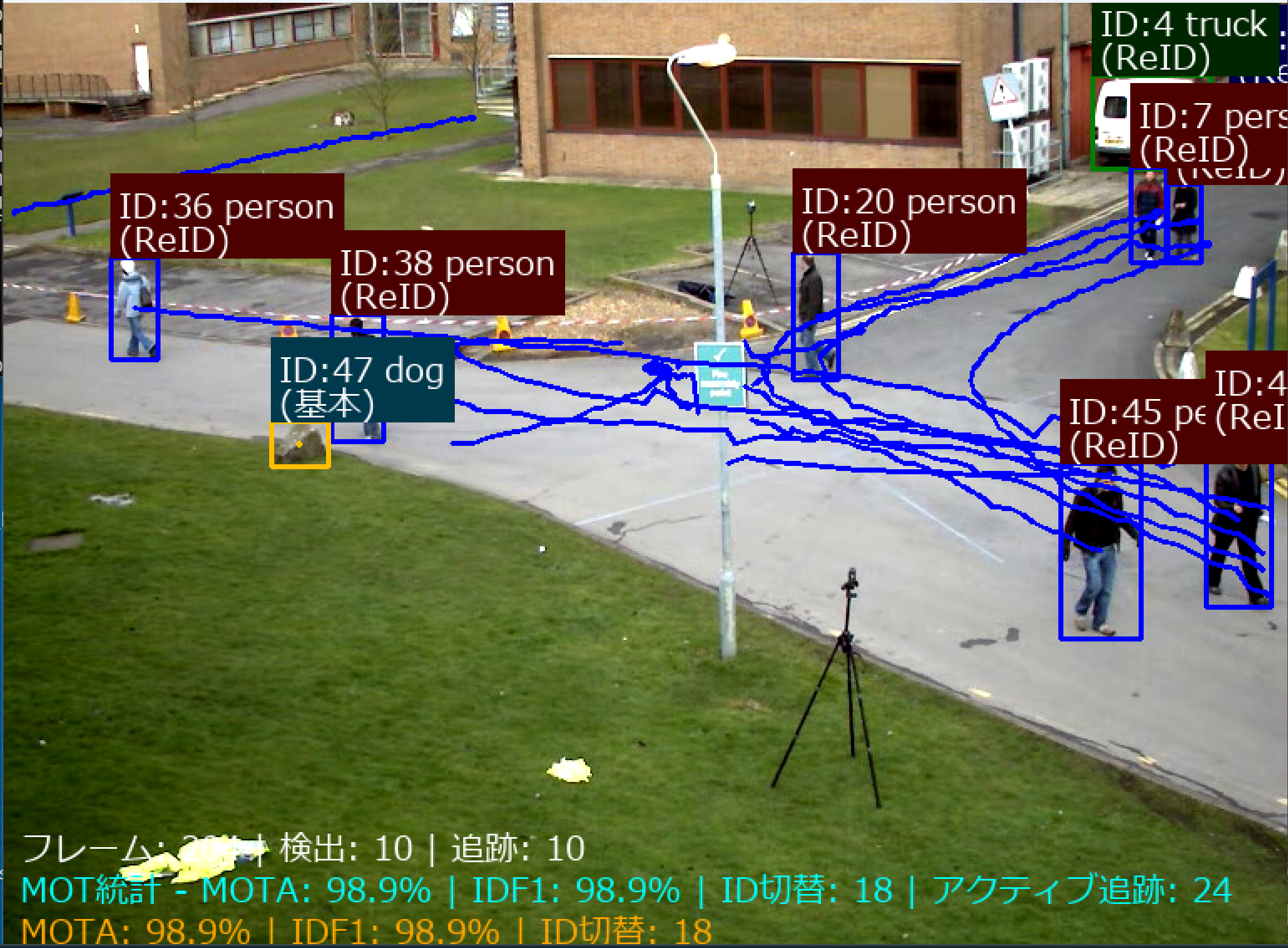
【目次】
第1章 Python開発環境,ライブラリ類
ここでは、最低限の事前準備について説明する。機械学習や深層学習を行う場合は、NVIDIA CUDA、Visual Studio、Cursorなどを追加でインストールすると便利である。これらについては別ページ https://www.kkaneko.jp/cc/dev/aiassist.htmlで詳しく解説しているので、必要に応じて参照してください。
第2章 Python 3.12 のインストール
Pythonのインストールを行い、Pythonのプログラムを実行する環境を整える。扱う環境は、Windows搭載パソコンである。金子研究室では、Python 3.12.10を推奨する。
[Windows での Python 3.12 のインストール手順を見るには、ここをクリック]
Windows での Python 3.12 のインストール
以下のいずれかの方法でPython 3.12をインストールする。Pythonがインストール済みの場合、この手順は不要である。
方法 1:winget によるインストール
【インストールコマンドの実行方法】
管理者権限でコマンドプロンプトを起動する(手順:Windowsキーまたはスタートメニュー → cmd と入力 → 右クリック → 「管理者として実行」)。そして、コマンド全体をコマンドプロンプトにコピー&ペーストする。
--scope machine を指定することで、システム全体(全ユーザー向け)にインストールされる。このオプションの実行には管理者権限が必要である。インストール完了後、コマンドプロンプトを再起動するとPATHが反映される。
REM Python 3.12 をシステム領域にインストール
winget install --id Python.Python.3.12 -e --scope machine --silent --accept-source-agreements --accept-package-agreements --override "/quiet InstallAllUsers=1 PrependPath=1 Include_test=0 Include_pip=1 Include_launcher=1 InstallLauncherAllUsers=1 TargetDir=\"C:\Program Files\Python312\""
if not "%ERRORLEVEL%"=="0" ( color 0c & echo Python 3.12 のインストールに失敗しました & ping 127.0.0.1 -n 6 >nul & color )

REM Python と Scripts を PATH 先頭に追加
powershell -NoProfile -Command "$p='C:\Program Files\Python312'; $s=\"$p\Scripts\"; if(Test-Path $p){$k=[Microsoft.Win32.Registry]::LocalMachine.OpenSubKey('SYSTEM\CurrentControlSet\Control\Session Manager\Environment',$true); $c=$k.GetValue('Path','',[Microsoft.Win32.RegistryValueOptions]::DoNotExpandEnvironmentNames); $t=$k.GetValueKind('Path'); $new=$c; if((';'+$new+';') -notlike \"*;$p;*\"){$new=$p+';'+$new}; if((';'+$new+';') -notlike \"*;$s;*\"){$new=$s+';'+$new}; if($new -ne $c){$k.SetValue('Path',$new,$t)}; $k.Close()}"

REM 現在のセッションにも反映(システムPATHを再取得して連結)
for /f "usebackq tokens=2,*" %A in (`reg query "HKLM\SYSTEM\CurrentControlSet\Control\Session Manager\Environment" /v Path`) do set "PATH=%B"

REM pip / wheel の更新
python -m pip install --no-user -U pip wheel
if not "%ERRORLEVEL%"=="0" ( color 0c & echo pip / wheel の更新に失敗しました & ping 127.0.0.1 -n 6 >nul & color )
方法 2:インストーラーによるインストール
- Python公式サイト(https://www.python.org/downloads/)にアクセスし、「Download Python 3.x.x」ボタンからWindows用インストーラーをダウンロードする。
- ダウンロードしたインストーラーを実行する。
- 初期画面の下部に表示される「Add python.exe to PATH」にチェックを入れてから「Customize installation」を選択する。このチェックを入れ忘れると、コマンドプロンプトから
pythonコマンドを実行できない。 - 「Install Python 3.xx for all users」にチェックを入れ、「Install」をクリックする。
インストールの確認
コマンドプロンプトで以下を実行する。
python --versionバージョン番号(例:Python 3.12.x)が表示されればインストール成功である。「'python' は、内部コマンドまたは外部コマンドとして認識されていません。」と表示される場合は、インストールが正常に完了していない。
第3章 Python の開発環境 Visual Studio Code のインストールと Python 用の設定
Python の開発環境Visual Studio Code(プログラムを編集するソフトウェア。以下、VS Code)を整える。
[Windows での Visual Studio Code のインストールと Python 用の設定手順を見るには、ここをクリック]
Windows での Visual Studio Code のインストールと Python 用の設定手順
1. VS Code と拡張機能のインストール
以下のコマンドにより,既存の VS Code を削除し,全ユーザー共有の設定で再インストールしたうえで,拡張機能(VS Code に機能を追加するソフトウェア)をまとめて導入する.
【インストールコマンドの実行方法】
管理者権限でコマンドプロンプトを起動する(手順:Windows キーまたはスタートメニュー → cmd と入力 → 右クリック → 「管理者として実行」)。そして,コマンド全体をコマンドプロンプトにコピー&ペーストする。
インストールコマンド
REM ============================================================
REM Microsoft Visual Studio Code
REM ============================================================
REM Build Tools + Desktop development with C++(VCTools)+ 追加コンポーネント(一括)
REM 未インストール時: winget で新規インストール
REM インストール済み時: setup.exe modify でコンポーネント追加(バージョンは変更しない)
winget list --id Microsoft.VisualStudio.BuildTools 2>nul | findstr /i "BuildTools" >nul 2>&1
if %ERRORLEVEL% EQU 0 (
    for /f "usebackq delims=" %P in (`"C:\Program Files (x86)\Microsoft Visual Studio\Installer\vswhere.exe" -products Microsoft.VisualStudio.Product.BuildTools -property installationPath`) do start /wait "" "C:\Program Files (x86)\Microsoft Visual Studio\Installer\setup.exe" modify --installPath "%P" --add Microsoft.VisualStudio.Workload.VCTools --add Microsoft.VisualStudio.Workload.MSBuildTools --add Microsoft.VisualStudio.Component.VC.CMake.Project --add Microsoft.VisualStudio.Component.VC.Llvm.Clang --add Microsoft.VisualStudio.Component.VC.Llvm.ClangToolset --add Microsoft.VisualStudio.Component.Windows11SDK.26100 --add Microsoft.VisualStudio.Component.VC.v143.x86.x64 --includeRecommended --quiet --norestart --nocache
    if not "%ERRORLEVEL%"=="0" ( color 0c & echo Build Tools のコンポーネント追加に失敗しました & ping 127.0.0.1 -n 6 >nul & color )
) else (
    winget install --scope machine --id Microsoft.VisualStudio.BuildTools -e --silent --disable-interactivity --force --accept-source-agreements --accept-package-agreements --override "--quiet --wait --norestart --nocache --add Microsoft.VisualStudio.Workload.VCTools --includeRecommended --add Microsoft.VisualStudio.Workload.MSBuildTools --add Microsoft.VisualStudio.Component.VC.CMake.Project --add Microsoft.VisualStudio.Component.VC.Llvm.Clang --add Microsoft.VisualStudio.Component.VC.Llvm.ClangToolset --add Microsoft.VisualStudio.Component.Windows11SDK.26100 --add Microsoft.VisualStudio.Component.VC.v143.x86.x64"
    if not "%ERRORLEVEL%"=="0" ( color 0c & echo Build Tools のインストールに失敗しました & ping 127.0.0.1 -n 6 >nul & color )
)

REM 全ユーザー共有の拡張機能フォルダ
if not exist "C:\ProgramData\vscode-extensions" mkdir "C:\ProgramData\vscode-extensions"
icacls "C:\ProgramData\vscode-extensions" /grant "Everyone:(OI)(CI)M" /T

REM スタートメニューのショートカットを --extensions-dir 付きで再作成
if exist "C:\ProgramData\Microsoft\Windows\Start Menu\Programs\Visual Studio Code" rmdir /s /q "C:\ProgramData\Microsoft\Windows\Start Menu\Programs\Visual Studio Code"
if exist "C:\ProgramData\Microsoft\Windows\Start Menu\Programs\Visual Studio Code.lnk" del "C:\ProgramData\Microsoft\Windows\Start Menu\Programs\Visual Studio Code.lnk"
powershell -NoProfile -Command "$s=New-Object -ComObject WScript.Shell; $lnk=$s.CreateShortcut('C:\ProgramData\Microsoft\Windows\Start Menu\Programs\Visual Studio Code.lnk'); $lnk.TargetPath='C:\Program Files\Microsoft VS Code\Code.exe'; $lnk.Arguments='--extensions-dir \"C:\ProgramData\vscode-extensions\"'; $lnk.Save()"
REM ショートカットの検証
powershell -NoProfile -Command "$s=New-Object -ComObject WScript.Shell; $lnk=$s.CreateShortcut('C:\ProgramData\Microsoft\Windows\Start Menu\Programs\Visual Studio Code.lnk'); Write-Host 'TargetPath:' $lnk.TargetPath; Write-Host 'Arguments:' $lnk.Arguments"

REM ファイル / フォルダ右クリックの「Code で開く」を登録
reg add "HKLM\SOFTWARE\Classes\*\shell\VSCode\command" /ve /d "\"C:\Program Files\Microsoft VS Code\Code.exe\" --extensions-dir \"C:\ProgramData\vscode-extensions\" \"%1\"" /f
reg add "HKLM\SOFTWARE\Classes\Directory\shell\VSCode\command" /ve /d "\"C:\Program Files\Microsoft VS Code\Code.exe\" --extensions-dir \"C:\ProgramData\vscode-extensions\" \"%1\"" /f
reg add "HKLM\SOFTWARE\Classes\Directory\Background\shell\VSCode\command" /ve /d "\"C:\Program Files\Microsoft VS Code\Code.exe\" --extensions-dir \"C:\ProgramData\vscode-extensions\" \"%V\"" /f

REM --extensions-dir 付きで起動する code.cmd ラッパを作成
REM (%* を echo で書くと対話的 cmd で失われるため、PowerShell で [char]37+'*' を書き出す)
powershell -NoProfile -Command "$pct=[char]37; $q=[char]34; $c='@echo off'+[char]13+[char]10+$q+'C:\Program Files\Microsoft VS Code\bin\code.cmd'+$q+' --extensions-dir '+$q+'C:\ProgramData\vscode-extensions'+$q+' '+$pct+'*'+[char]13+[char]10; [IO.File]::WriteAllText('C:\ProgramData\vscode-extensions\vscode.cmd',$c,[Text.Encoding]::ASCII)"

REM 拡張機能のインストール
set "CODE=C:\Program Files\Microsoft VS Code\bin\code.cmd"
"%CODE%" --extensions-dir "C:\ProgramData\vscode-extensions" --uninstall-extension GitHub.copilot
"%CODE%" --extensions-dir "C:\ProgramData\vscode-extensions" --uninstall-extension GitHub.copilot-chat
"%CODE%" --extensions-dir "C:\ProgramData\vscode-extensions" --install-extension ms-python.python
"%CODE%" --extensions-dir "C:\ProgramData\vscode-extensions" --install-extension ms-python.vscode-pylance
"%CODE%" --extensions-dir "C:\ProgramData\vscode-extensions" --install-extension ms-python.debugpy
"%CODE%" --extensions-dir "C:\ProgramData\vscode-extensions" --install-extension MS-CEINTL.vscode-language-pack-ja
"%CODE%" --extensions-dir "C:\ProgramData\vscode-extensions" --install-extension saoudrizwan.claude-dev
"%CODE%" --extensions-dir "C:\ProgramData\vscode-extensions" --install-extension rust-lang.rust-analyzer
"%CODE%" --extensions-dir "C:\ProgramData\vscode-extensions" --install-extension tamasfe.even-better-toml
"%CODE%" --extensions-dir "C:\ProgramData\vscode-extensions" --install-extension anthropic.claude-code
"%CODE%" --extensions-dir "C:\ProgramData\vscode-extensions" --install-extension almenon.arepl
"%CODE%" --extensions-dir "C:\ProgramData\vscode-extensions" --list-extensions --show-versions

REM settings.json を作成(自動更新オフ、Python、Claude Code 設定)
if not exist "%APPDATA%\Code\User" mkdir "%APPDATA%\Code\User"
python -c "import json,os;data={'update.mode':'none','update.enableWindowsBackgroundUpdates':False,'extensions.autoUpdate':False,'python.defaultInterpreterPath':r'C:\Program Files\Python312\python.exe','claudeCode.environmentVariables':[{'name':'ANTHROPIC_API_KEY','value':'not-needed'},{'name':'ANTHROPIC_AUTH_TOKEN','value':'ollama'},{'name':'ANTHROPIC_BASE_URL','value':'http://localhost:11434'},{'name':'ANTHROPIC_MODEL','value':'glm-4.7-flash'},{'name':'CLAUDE_CODE_DISABLE_NONESSENTIAL_TRAFFIC','value':'1'}]};p=os.path.join(os.environ['APPDATA'],'Code','User','settings.json');open(p,'w',encoding='utf-8').write(json.dumps(data,indent=4));print('Done:',p)"

REM 自動更新の抑止ポリシー(settings.json に加えて、レジストリ側でも明示的にオフ)
reg add "HKLM\SOFTWARE\Policies\Microsoft\VSCode" /v "UpdateMode" /t REG_SZ /d "none" /f
echo === セットアップ完了 ===
2. Python インタプリタの選択
同一マシンに複数の Python がインストールされている場合,VS Code で使用する Python 本体(インタプリタ:Python プログラムを解釈・実行するソフトウェア)を選択する必要がある.
- コマンドパレット(コマンド名で機能を呼び出す VS Code の入力欄)を開く(
Ctrl+Shift+P) Python: Select Interpreterと入力する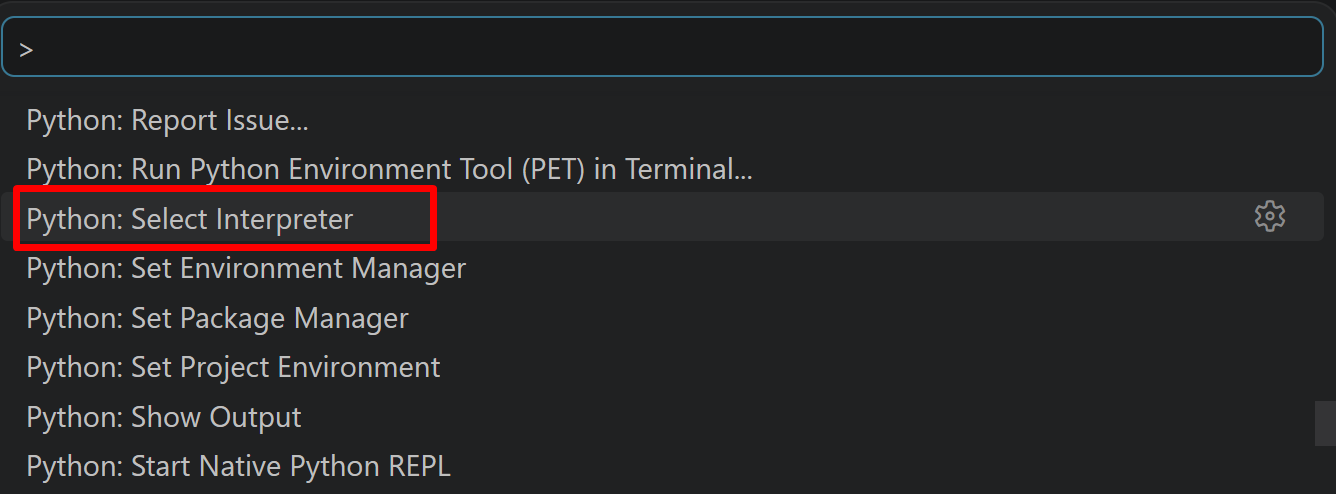
- 表示される一覧から,使用する Python(例:
C:\Program Files\Python312\python.exe)を選択する.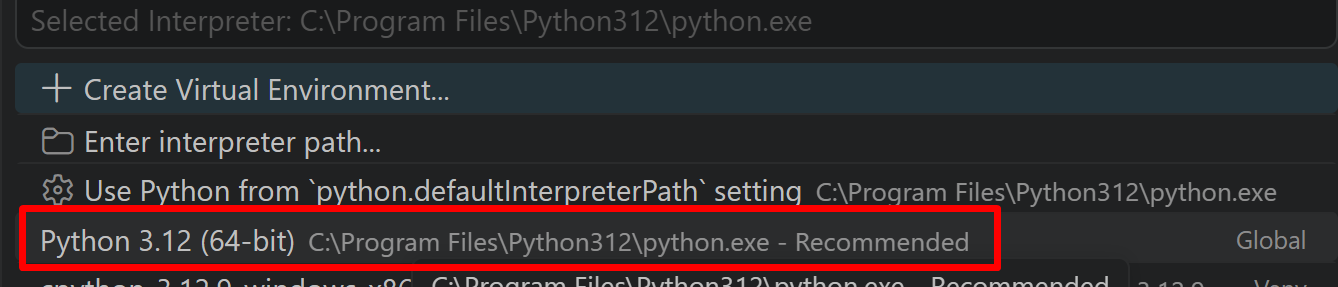
必要なライブラリをシステム領域にインストール
管理者権限でコマンドプロンプトを起動する
(手順:Windowsキーまたはスタートメニュー → cmd と入力 → 右クリック → 「管理者として実行」)。
REM PyTorch をインストール(GPU対応版)
set "CUDA_TAG=cu128"
set "PYTHON_PATH=C:\Program Files\Python312"
"%PYTHON_PATH%\Scripts\pip" install --no-user -U numpy torch torchvision torchaudio --index-url https://download.pytorch.org/whl/%CUDA_TAG%
pip install --no-user -U ultralytics opencv-python pillow
第4章 Ultralytics ReID統合版によるマルチオブジェクトトラッキング
概要
このプログラムは、Ultralytics YOLO26による物体検出に、BoT-SORTのReID機能(外観特徴による再識別)を組み合わせたマルチオブジェクトトラッキングシステムである。動きの予測だけでなく、物体の見た目の特徴も用いることで、遮蔽から再出現した物体に同一のIDを保ちやすくする。
ソースコード
# -*- coding: utf-8 -*-
"""
Ultralytics ReID統合版によるマルチオブジェクトトラッキング

特徴技術名: BoT-SORT(ReID有効化)
出典: Aharon, N., Orfaig, R., & Bobrovsky, B. (2022). BoT-SORT: Robust Associations
     Multi-Pedestrian Tracking. arXiv:2206.14651.

特徴機能: カルマンフィルタによる動き予測に加え、外観特徴(ReID embedding)を
         コスト行列に統合することで、遮蔽から再出現した物体のID一貫性を高める

学習済みモデル: YOLO26n (yolo26n.pt)
               - 概要: 軽量版YOLO26モデル、COCOデータセット80クラス対応
               - URL: 自動ダウンロード (https://github.com/ultralytics/ultralytics)
               ReIDモデル: model: auto(YOLO検出器のネイティブ特徴を使用。
               利用できない場合は yolo26n-cls.pt に自動フォールバック)

前準備:
  pip install --no-user -U ultralytics opencv-python pillow torch
"""

import cv2
import tkinter as tk
from tkinter import filedialog
import os
import numpy as np
import torch
from ultralytics import YOLO
from PIL import Image, ImageDraw, ImageFont
import urllib.request
import time
import yaml

# GPU/CPU自動選択
device = torch.device('cuda' if torch.cuda.is_available() else 'cpu')
print(f'デバイス: {str(device)}')
# GPU使用時の最適化
if device.type == 'cuda':
    torch.backends.cudnn.benchmark = True

# 設定値
CONFIDENCE_THRESHOLD = 0.3
TRACK_HIGH_THRESH = 0.25
TRACK_LOW_THRESH = 0.1
NEW_TRACK_THRESH = 0.25
TRACK_BUFFER = 30
MATCH_THRESH = 0.8
APPEARANCE_THRESH = 0.25
PROXIMITY_THRESH = 0.5
DISPLAY_INTERVAL = 1.0
FONT_SIZE = 20
FONT_PATH = 'C:/Windows/Fonts/meiryo.ttc'

# COCO 80クラス色パレット
CLASS_COLORS = [
    (255, 0, 0), (0, 255, 0), (0, 0, 255), (255, 255, 0), (255, 0, 255),
    (0, 255, 255), (128, 0, 0), (0, 128, 0), (0, 0, 128), (128, 128, 0),
    (128, 0, 128), (0, 128, 128), (192, 192, 192), (128, 128, 128), (255, 165, 0),
    (255, 20, 147), (0, 191, 255), (255, 69, 0), (255, 140, 0), (173, 255, 47),
    (240, 230, 140), (220, 20, 60), (0, 100, 0), (255, 105, 180), (75, 0, 130),
    (255, 215, 0), (186, 85, 211), (147, 112, 219), (218, 112, 214), (255, 182, 193),
    (176, 196, 222), (255, 160, 122), (205, 92, 92), (240, 128, 128), (221, 160, 221),
    (255, 228, 181), (255, 222, 173), (245, 222, 179), (222, 184, 135), (210, 180, 140),
    (188, 143, 143), (105, 105, 105), (119, 136, 153), (112, 128, 144), (47, 79, 79),
    (85, 107, 47), (154, 205, 50), (127, 255, 0), (255, 127, 80), (255, 99, 71),
    (255, 215, 0), (255, 20, 147), (255, 69, 0), (255, 140, 0), (255, 165, 0),
    (255, 192, 203), (160, 82, 45), (205, 133, 63), (72, 61, 139), (106, 90, 205),
    (123, 104, 238), (72, 209, 204), (199, 21, 133), (25, 25, 112), (255, 0, 255),
    (255, 20, 147), (138, 43, 226), (30, 144, 255), (255, 105, 180), (255, 69, 0),
    (255, 140, 0), (70, 130, 180), (176, 224, 230), (139, 69, 19), (160, 82, 45),
    (210, 105, 30), (205, 92, 92), (184, 134, 11), (218, 165, 32), (238, 203, 173)
]

def get_class_color(class_id):
    if class_id < len(CLASS_COLORS):
        return CLASS_COLORS[class_id]
    else:
        np.random.seed(class_id)
        return tuple(np.random.randint(0, 255, 3).tolist())

def create_botsort_config():
    return {
        'tracker_type': 'botsort',
        'track_high_thresh': TRACK_HIGH_THRESH,
        'track_low_thresh': TRACK_LOW_THRESH,
        'new_track_thresh': NEW_TRACK_THRESH,
        'track_buffer': TRACK_BUFFER,
        'match_thresh': MATCH_THRESH,
        'fuse_score': True,
        'gmc_method': 'sparseOptFlow',
        'with_reid': True,
        'model': 'auto',
        'proximity_thresh': PROXIMITY_THRESH,
        'appearance_thresh': APPEARANCE_THRESH
    }

def save_tracker_config(config):
    config_path = "botsort_reid.yaml"
    with open(config_path, 'w', encoding='utf-8') as f:
        yaml.dump(config, f, default_flow_style=False, allow_unicode=True)
    return config_path

class MOTMetrics:
    def __init__(self):
        self.total_detections = 0
        self.total_tracks = 0
        self.active_tracks = set()
        self.track_history = {}
        self.id_switches = 0
        self.processing_times = []
        self.previous_tracks = {}
        self.frame_count = 0

    def update(self, detections_data, processing_time):
        self.frame_count += 1
        self.processing_times.append(processing_time)

        current_tracks = {}
        detection_count = len(detections_data)
        track_count = 0

        for detection in detections_data:
            self.total_detections += 1

            if detection['tracker_id'] is not None:
                track_id = detection['tracker_id']
                track_count += 1
                current_tracks[track_id] = {
                    'center': detection['center'],
                    'confidence': detection['confidence']
                }

                if track_id not in self.track_history:
                    self.track_history[track_id] = []
                self.track_history[track_id].append(self.frame_count)
                self.active_tracks.add(track_id)

        self.total_tracks += track_count
        self._detect_id_switches(current_tracks)
        self.previous_tracks = current_tracks.copy()

    def _detect_id_switches(self, current_tracks):
        if not self.previous_tracks or not current_tracks:
            return

        for prev_id, prev_data in self.previous_tracks.items():
            prev_center = prev_data['center']
            min_distance = float('inf')
            closest_id = None

            for curr_id, curr_data in current_tracks.items():
                curr_center = curr_data['center']
                distance = np.sqrt((prev_center[0] - curr_center[0])**2 +
                                 (prev_center[1] - curr_center[1])**2)

                if distance < min_distance:
                    min_distance = distance
                    closest_id = curr_id

            if closest_id and min_distance < 50 and closest_id != prev_id:
                if prev_id not in current_tracks:
                    self.id_switches += 1

    def calculate_mot_metrics(self):
        if self.total_detections == 0:
            return {
                'MOTA': 0.0, 'MOTP': 0.0, 'IDP': 0.0, 'IDR': 0.0, 'IDF1': 0.0,
                'ID_Switches': 0, 'False_Negatives': 0, 'Total_Tracks': 0,
                'Avg_Processing_Time': 0
            }

        fn = self.total_detections - self.total_tracks
        fp = max(0, self.total_tracks - self.total_detections)
        ids = self.id_switches

        mota = max(0.0, 1.0 - (fn + fp + ids) / max(1, self.total_detections))
        motp = self.total_tracks / max(1, self.total_detections)
        idp = max(0.0, (self.total_tracks - ids) / max(1, self.total_tracks))
        idr = max(0.0, (self.total_tracks - ids) / max(1, self.total_detections))
        idf1 = 2 * (idp * idr) / max(0.001, idp + idr)

        return {
            'MOTA': mota * 100, 'MOTP': motp * 100, 'IDP': idp * 100,
            'IDR': idr * 100, 'IDF1': idf1 * 100, 'ID_Switches': ids,
            'False_Negatives': fn, 'Total_Tracks': len(self.active_tracks),
            'Avg_Processing_Time': np.mean(self.processing_times) if self.processing_times else 0
        }

    def get_stats_text(self):
        if self.frame_count == 0:
            return "MOT統計: 初期化中"
        metrics = self.calculate_mot_metrics()
        return (f"MOT統計 - MOTA: {metrics['MOTA']:.1f}% | "
                f"IDF1: {metrics['IDF1']:.1f}% | "
                f"ID切替: {metrics['ID_Switches']} | "
                f"アクティブ追跡: {metrics['Total_Tracks']}")

def process_frame(frame, model, tracker_config_path, font, log, frame_count, last_print_time, mot_metrics):
    start_time = time.time()

    results = model.track(
        frame, persist=True, conf=CONFIDENCE_THRESHOLD,
        tracker=tracker_config_path, verbose=False
    )

    result = results[0]
    detections_data = []
    detection_count = 0
    tracked_count = 0

    if result.boxes is not None:
        boxes = result.boxes
        detection_count = len(boxes.xyxy)
        has_tracker_ids = hasattr(boxes, 'id') and boxes.id is not None

        for i in range(detection_count):
            x1, y1, x2, y2 = boxes.xyxy[i].cpu().numpy()
            center_x = (x1 + x2) / 2
            center_y = (y1 + y2) / 2
            confidence = boxes.conf[i].cpu().numpy() if boxes.conf is not None else 0.0

            class_name = "object"
            class_id = 0
            if boxes.cls is not None and hasattr(result, 'names'):
                class_id = int(boxes.cls[i].cpu().numpy())
                class_name = result.names.get(class_id, "object")

            if has_tracker_ids and i < len(boxes.id):
                tracker_id = int(boxes.id[i].cpu().numpy())
                tracked_count += 1
            else:
                tracker_id = None

            detections_data.append({
                'bbox': (int(x1), int(y1), int(x2), int(y2)),
                'center': (center_x, center_y),
                'confidence': confidence,
                'class_name': class_name,
                'class_id': class_id,
                'tracker_id': tracker_id
            })

    processing_time = time.time() - start_time
    mot_metrics.update(detections_data, processing_time)

    # フレーム描画
    ann_frame = frame.copy()

    if detections_data:
        current_time = time.strftime("%Y-%m-%d %H:%M:%S")

        # まず OpenCV で四角を描画
        for detection in detections_data:
            x1, y1, x2, y2 = detection['bbox']
            class_id = detection['class_id']
            bbox_color = get_class_color(class_id)

            # バウンディングボックス描画(クラス別色)
            cv2.rectangle(ann_frame, (x1, y1), (x2, y2), bbox_color, 2)

        # 次に PIL でテキストを描画
        img_pil = Image.fromarray(cv2.cvtColor(ann_frame, cv2.COLOR_BGR2RGB))
        draw = ImageDraw.Draw(img_pil)

        for detection in detections_data:
            x1, y1, x2, y2 = detection['bbox']
            class_id = detection['class_id']
            class_name = detection['class_name']
            bbox_color = get_class_color(class_id)

            if detection['tracker_id'] is not None:
                main_text = f"ID:{detection['tracker_id']} {class_name}"
                status_text = "(BoT-SORT+ReID)"
            else:
                main_text = f"{class_name} (検出)"
                status_text = ""

            text_bg_color = tuple(int(c * 0.3) for c in bbox_color)
            text_color = (255, 255, 255)

            bbox = draw.textbbox((0, 0), main_text, font=font)
            text_width = bbox[2] - bbox[0]

            bg_height = 50 if status_text else 30

            # テキスト背景をPILで描画
            draw.rectangle([x1, y1-bg_height, x1 + text_width + 10, y1], fill=text_bg_color)
            draw.text((x1 + 5, y1-45), main_text, font=font, fill=text_color)
            if status_text:
                draw.text((x1 + 5, y1-25), status_text, font=font, fill=text_color)

            log_entry = (f"{current_time},ID:{detection['tracker_id']},クラス:{detection['class_name']},"
                       f"信頼度:{detection['confidence']:.3f},"
                       f"座標:({detection['center'][0]:.1f},{detection['center'][1]:.1f})")
            log.append(log_entry)

        ann_frame = cv2.cvtColor(np.array(img_pil), cv2.COLOR_RGB2BGR)

    # 統計情報表示
    img_pil_status = Image.fromarray(cv2.cvtColor(ann_frame, cv2.COLOR_BGR2RGB))
    draw_status = ImageDraw.Draw(img_pil_status)

    status_text = f"フレーム: {frame_count} | 検出: {detection_count} | 追跡: {tracked_count}"
    draw_status.text((10, ann_frame.shape[0] - 85), status_text, font=font, fill=(255, 255, 255))

    mot_stats_text = mot_metrics.get_stats_text()
    draw_status.text((10, ann_frame.shape[0] - 60), mot_stats_text, font=font, fill=(0, 255, 255))

    mot_detailed = mot_metrics.calculate_mot_metrics()
    detailed_text = f"MOTA: {mot_detailed['MOTA']:.1f}% | IDF1: {mot_detailed['IDF1']:.1f}% | ID切替: {mot_detailed['ID_Switches']}"
    draw_status.text((10, ann_frame.shape[0] - 35), detailed_text, font=font, fill=(255, 165, 0))

    ann_frame = cv2.cvtColor(np.array(img_pil_status), cv2.COLOR_RGB2BGR)

    # 定期出力
    current_time_sec = time.time()
    if current_time_sec - last_print_time >= DISPLAY_INTERVAL:
        if detections_data:
            print(f"\n[フレーム {frame_count}] 検出: {detection_count} | 追跡: {tracked_count}")
            print(f"MOTA: {mot_detailed['MOTA']:.2f}% | IDF1: {mot_detailed['IDF1']:.2f}% | ID切替: {mot_detailed['ID_Switches']}")
        last_print_time = current_time_sec

    return ann_frame, last_print_time

def main():
    print("=" * 60)
    print("マルチオブジェクトトラッキングシステム")
    print("=" * 60)

    print("\n【入力ソース選択】")
    print("0: 動画ファイル")
    print("1: カメラ")
    print("2: サンプル動画")

    choice = input("\n選択してください: ")
    temp_file = None
    log = []

    print("\nシステム初期化中...")

    model = YOLO("yolo26n.pt")
    model.to(device)
    print("✓ YOLO26モデル読み込み完了")

    tracker_config = create_botsort_config()
    tracker_config_path = save_tracker_config(tracker_config)
    print("✓ トラッカー設定完了")

    font = ImageFont.truetype(FONT_PATH, FONT_SIZE)
    print("✓ フォント設定完了")

    mot_metrics = MOTMetrics()
    print("✓ MOT評価指標初期化完了")

    print("初期化完了!")

    # 入力ソース設定
    if choice == '0':
        print("動画ファイルを選択してください...")
        root = tk.Tk()
        root.withdraw()
        path = filedialog.askopenfilename(
            title="動画ファイルを選択",
            filetypes=[("動画ファイル", "*.mp4 *.avi *.mov *.mkv"), ("全ファイル", "*.*")]
        )
        root.destroy()
        if not path:
            print("ファイルが選択されませんでした。")
            return
        cap = cv2.VideoCapture(path)
    elif choice == '1':
        cap = cv2.VideoCapture(0, cv2.CAP_DSHOW)
        if not cap.isOpened():
            cap = cv2.VideoCapture(0)
        if not cap.isOpened():
            print("カメラを開けませんでした。")
            return
        cap.set(cv2.CAP_PROP_BUFFERSIZE, 1)
    elif choice == '2':
        url = "https://raw.githubusercontent.com/opencv/opencv/master/samples/data/vtest.avi"
        filename = "vtest.avi"
        print("サンプル動画をダウンロード中...")
        urllib.request.urlretrieve(url, filename)
        temp_file = filename
        cap = cv2.VideoCapture(filename)
        print("サンプル動画準備完了")
    else:
        print("無効な選択です。")
        return

    print("\nトラッキング開始 - 'q'で終了")

    frame_count = 0
    last_print_time = time.time()

    try:
        while True:
            ret, frame = cap.read()
            if not ret:
                print("動画の最後に到達しました。")
                break

            frame_count += 1
            processed_frame, last_print_time = process_frame(
                frame, model, tracker_config_path, font, log, frame_count,
                last_print_time, mot_metrics
            )

            cv2.imshow('Multi-Object Tracking', processed_frame)

            if cv2.waitKey(1) & 0xFF == ord('q'):
                print("\n終了が要求されました。")
                break

    except KeyboardInterrupt:
        print("\nキーボード割り込みにより終了します。")
    finally:
        cap.release()
        cv2.destroyAllWindows()
        if temp_file and os.path.exists(temp_file):
            os.remove(temp_file)
        if os.path.exists(tracker_config_path):
            os.remove(tracker_config_path)

    # 結果保存
    print("\n処理結果を保存中...")

    final_mot_metrics = mot_metrics.calculate_mot_metrics()

    with open('tracking_result.txt', 'w', encoding='utf-8') as f:
        f.write("トラッキング結果\n")
        f.write("=" * 30 + "\n")
        f.write(f"MOTA: {final_mot_metrics['MOTA']:.2f}%\n")
        f.write(f"IDF1: {final_mot_metrics['IDF1']:.2f}%\n")
        f.write(f"ID切替数: {final_mot_metrics['ID_Switches']}\n")
        f.write(f"総フレーム数: {frame_count}\n")
        f.write(f"総検出数: {mot_metrics.total_detections}\n")
        f.write(f"総追跡数: {mot_metrics.total_tracks}\n")
        f.write("-" * 30 + "\n")
        for log_entry in log:
            f.write(log_entry + "\n")

    print("結果をtracking_result.txtに保存しました")
    print(f"MOTA: {final_mot_metrics['MOTA']:.2f}%")
    print(f"IDF1: {final_mot_metrics['IDF1']:.2f}%")
    print("プログラム終了")

if __name__ == "__main__":
    main()