![[kaneko lab.]](https://www.kkaneko.jp/info/logo_png.png)
Qwen3-VL による Visual Question Answering(ソースコードと実行結果)
【概要】
画像に関する質問に自然言語で答えるVisual Question Answering(視覚質問応答)のPythonプログラムを扱う。視覚言語モデルにはQwen3-VLを用いる。Qwen3-VLは、画像を入力できる大規模言語モデルであり、画像中の物体や場面の認識に加えて、文字の読み取り(OCR)や空間的な位置関係の把握を日本語を含む多言語で行える。画像ファイル、カメラ撮影、サンプル画像のいずれかを入力として選び、あらかじめ用意した質問か自由入力の質問を与えると、回答が生成されて画面に表示され、result.txtに保存される。
【目次】
- 第1章 Python開発環境,ライブラリ類
- 第2章 Python 3.12 のインストール
- 第3章 Python の開発環境 Visual Studio Code のインストールと Python 用の設定
- 第4章 Qwen3-VL による Visual Question Answering プログラム
【関連する外部ページ】
- Qwen3-VL の学習済みモデル(Hugging Face): https://huggingface.co/Qwen/Qwen3-VL-8B-Instruct
- Transformers の Qwen3-VL ドキュメント: https://huggingface.co/docs/transformers/model_doc/qwen3_vl
- Qwen3 の技術報告: https://arxiv.org/abs/2505.09388
【サイト内の関連情報】
第1章 Python開発環境,ライブラリ類
ここでは、最低限の事前準備について説明する。機械学習や深層学習を行う場合は、NVIDIA CUDA、Visual Studio、Cursorなどを追加でインストールすると便利である。これらについては別ページ https://www.kkaneko.jp/cc/dev/aiassist.html で解説している。
第2章 Python 3.12 のインストール
Pythonのインストールを行い、Pythonのプログラムを実行する環境を整える。扱う環境は、Windows搭載パソコンである。金子研究室では、Python 3.12.10を推奨する。
[Windows での Python 3.12 のインストール手順を見るには、ここをクリック]
Windows での Python 3.12 のインストール
以下のいずれかの方法でPython 3.12をインストールする。Pythonがインストール済みの場合、この手順は不要である。
方法 1:winget によるインストール
【インストールコマンドの実行方法】
管理者権限でコマンドプロンプトを起動する(手順:Windowsキーまたはスタートメニュー → cmd と入力 → 右クリック → 「管理者として実行」)。そして、コマンド全体をコマンドプロンプトにコピー&ペーストする。
--scope machine を指定することで、システム全体(全ユーザー向け)にインストールされる。このオプションの実行には管理者権限が必要である。インストール完了後、コマンドプロンプトを再起動するとPATHが反映される。
REM Python 3.12 をシステム領域にインストール
winget install --id Python.Python.3.12 -e --scope machine --silent --accept-source-agreements --accept-package-agreements --override "/quiet InstallAllUsers=1 PrependPath=1 Include_test=0 Include_pip=1 Include_launcher=1 InstallLauncherAllUsers=1 TargetDir=\"C:\Program Files\Python312\""
if not "%ERRORLEVEL%"=="0" ( color 0c & echo Python 3.12 のインストールに失敗しました & ping 127.0.0.1 -n 6 >nul & color )

REM Python と Scripts を PATH 先頭に追加
powershell -NoProfile -Command "$p='C:\Program Files\Python312'; $s=\"$p\Scripts\"; if(Test-Path $p){$k=[Microsoft.Win32.Registry]::LocalMachine.OpenSubKey('SYSTEM\CurrentControlSet\Control\Session Manager\Environment',$true); $c=$k.GetValue('Path','',[Microsoft.Win32.RegistryValueOptions]::DoNotExpandEnvironmentNames); $t=$k.GetValueKind('Path'); $new=$c; if((';'+$new+';') -notlike \"*;$p;*\"){$new=$p+';'+$new}; if((';'+$new+';') -notlike \"*;$s;*\"){$new=$s+';'+$new}; if($new -ne $c){$k.SetValue('Path',$new,$t)}; $k.Close()}"

REM 現在のセッションにも反映(システムPATHを再取得して連結)
for /f "usebackq tokens=2,*" %A in (`reg query "HKLM\SYSTEM\CurrentControlSet\Control\Session Manager\Environment" /v Path`) do set "PATH=%B"

REM pip / wheel の更新
python -m pip install --no-user -U pip wheel
if not "%ERRORLEVEL%"=="0" ( color 0c & echo pip / wheel の更新に失敗しました & ping 127.0.0.1 -n 6 >nul & color )
方法 2:インストーラーによるインストール
- Python公式サイト(https://www.python.org/downloads/)にアクセスし、「Download Python 3.x.x」ボタンからWindows用インストーラーをダウンロードする。
- ダウンロードしたインストーラーを実行する。
- 初期画面の下部に表示される「Add python.exe to PATH」にチェックを入れてから「Customize installation」を選択する。このチェックを入れ忘れると、コマンドプロンプトから
pythonコマンドを実行できない。 - 「Install Python 3.xx for all users」にチェックを入れ、「Install」をクリックする。
インストールの確認
コマンドプロンプトで以下を実行する。
python --versionバージョン番号(例:Python 3.12.x)が表示されればインストール成功である。「'python' は、内部コマンドまたは外部コマンドとして認識されていません。」と表示される場合は、インストールが正常に完了していない。
第3章 Python の開発環境 Visual Studio Code のインストールと Python 用の設定
Python の開発環境Visual Studio Code(プログラムを編集するソフトウェア。以下、VS Code)を整える。
[Windows での Visual Studio Code のインストールと Python 用の設定手順を見るには、ここをクリック]
Windows での Visual Studio Code のインストールと Python 用の設定手順
1. VS Code と拡張機能のインストール
以下のコマンドにより,既存の VS Code を削除し,全ユーザー共有の設定で再インストールしたうえで,拡張機能(VS Code に機能を追加するソフトウェア)をまとめて導入する.
【インストールコマンドの実行方法】
管理者権限でコマンドプロンプトを起動する(手順:Windows キーまたはスタートメニュー → cmd と入力 → 右クリック → 「管理者として実行」)。そして,コマンド全体をコマンドプロンプトにコピー&ペーストする。
インストールコマンド
REM ============================================================
REM Microsoft Visual Studio Code
REM ============================================================
REM Build Tools + Desktop development with C++(VCTools)+ 追加コンポーネント(一括)
REM 未インストール時: winget で新規インストール
REM インストール済み時: setup.exe modify でコンポーネント追加(バージョンは変更しない)
winget list --id Microsoft.VisualStudio.BuildTools 2>nul | findstr /i "BuildTools" >nul 2>&1
if %ERRORLEVEL% EQU 0 (
    for /f "usebackq delims=" %P in (`"C:\Program Files (x86)\Microsoft Visual Studio\Installer\vswhere.exe" -products Microsoft.VisualStudio.Product.BuildTools -property installationPath`) do start /wait "" "C:\Program Files (x86)\Microsoft Visual Studio\Installer\setup.exe" modify --installPath "%P" --add Microsoft.VisualStudio.Workload.VCTools --add Microsoft.VisualStudio.Workload.MSBuildTools --add Microsoft.VisualStudio.Component.VC.CMake.Project --add Microsoft.VisualStudio.Component.VC.Llvm.Clang --add Microsoft.VisualStudio.Component.VC.Llvm.ClangToolset --add Microsoft.VisualStudio.Component.Windows11SDK.26100 --add Microsoft.VisualStudio.Component.VC.v143.x86.x64 --includeRecommended --quiet --norestart --nocache
    if not "%ERRORLEVEL%"=="0" ( color 0c & echo Build Tools のコンポーネント追加に失敗しました & ping 127.0.0.1 -n 6 >nul & color )
) else (
    winget install --scope machine --id Microsoft.VisualStudio.BuildTools -e --silent --disable-interactivity --force --accept-source-agreements --accept-package-agreements --override "--quiet --wait --norestart --nocache --add Microsoft.VisualStudio.Workload.VCTools --includeRecommended --add Microsoft.VisualStudio.Workload.MSBuildTools --add Microsoft.VisualStudio.Component.VC.CMake.Project --add Microsoft.VisualStudio.Component.VC.Llvm.Clang --add Microsoft.VisualStudio.Component.VC.Llvm.ClangToolset --add Microsoft.VisualStudio.Component.Windows11SDK.26100 --add Microsoft.VisualStudio.Component.VC.v143.x86.x64"
    if not "%ERRORLEVEL%"=="0" ( color 0c & echo Build Tools のインストールに失敗しました & ping 127.0.0.1 -n 6 >nul & color )
)

REM 全ユーザー共有の拡張機能フォルダ
if not exist "C:\ProgramData\vscode-extensions" mkdir "C:\ProgramData\vscode-extensions"
icacls "C:\ProgramData\vscode-extensions" /grant "Everyone:(OI)(CI)M" /T

REM スタートメニューのショートカットを --extensions-dir 付きで再作成
if exist "C:\ProgramData\Microsoft\Windows\Start Menu\Programs\Visual Studio Code" rmdir /s /q "C:\ProgramData\Microsoft\Windows\Start Menu\Programs\Visual Studio Code"
if exist "C:\ProgramData\Microsoft\Windows\Start Menu\Programs\Visual Studio Code.lnk" del "C:\ProgramData\Microsoft\Windows\Start Menu\Programs\Visual Studio Code.lnk"
powershell -NoProfile -Command "$s=New-Object -ComObject WScript.Shell; $lnk=$s.CreateShortcut('C:\ProgramData\Microsoft\Windows\Start Menu\Programs\Visual Studio Code.lnk'); $lnk.TargetPath='C:\Program Files\Microsoft VS Code\Code.exe'; $lnk.Arguments='--extensions-dir \"C:\ProgramData\vscode-extensions\"'; $lnk.Save()"
REM ショートカットの検証
powershell -NoProfile -Command "$s=New-Object -ComObject WScript.Shell; $lnk=$s.CreateShortcut('C:\ProgramData\Microsoft\Windows\Start Menu\Programs\Visual Studio Code.lnk'); Write-Host 'TargetPath:' $lnk.TargetPath; Write-Host 'Arguments:' $lnk.Arguments"

REM ファイル / フォルダ右クリックの「Code で開く」を登録
reg add "HKLM\SOFTWARE\Classes\*\shell\VSCode\command" /ve /d "\"C:\Program Files\Microsoft VS Code\Code.exe\" --extensions-dir \"C:\ProgramData\vscode-extensions\" \"%1\"" /f
reg add "HKLM\SOFTWARE\Classes\Directory\shell\VSCode\command" /ve /d "\"C:\Program Files\Microsoft VS Code\Code.exe\" --extensions-dir \"C:\ProgramData\vscode-extensions\" \"%1\"" /f
reg add "HKLM\SOFTWARE\Classes\Directory\Background\shell\VSCode\command" /ve /d "\"C:\Program Files\Microsoft VS Code\Code.exe\" --extensions-dir \"C:\ProgramData\vscode-extensions\" \"%V\"" /f

REM --extensions-dir 付きで起動する code.cmd ラッパを作成
REM (%* を echo で書くと対話的 cmd で失われるため、PowerShell で [char]37+'*' を書き出す)
powershell -NoProfile -Command "$pct=[char]37; $q=[char]34; $c='@echo off'+[char]13+[char]10+$q+'C:\Program Files\Microsoft VS Code\bin\code.cmd'+$q+' --extensions-dir '+$q+'C:\ProgramData\vscode-extensions'+$q+' '+$pct+'*'+[char]13+[char]10; [IO.File]::WriteAllText('C:\ProgramData\vscode-extensions\vscode.cmd',$c,[Text.Encoding]::ASCII)"

REM 拡張機能のインストール
set "CODE=C:\Program Files\Microsoft VS Code\bin\code.cmd"
"%CODE%" --extensions-dir "C:\ProgramData\vscode-extensions" --uninstall-extension GitHub.copilot
"%CODE%" --extensions-dir "C:\ProgramData\vscode-extensions" --uninstall-extension GitHub.copilot-chat
"%CODE%" --extensions-dir "C:\ProgramData\vscode-extensions" --install-extension ms-python.python
"%CODE%" --extensions-dir "C:\ProgramData\vscode-extensions" --install-extension ms-python.vscode-pylance
"%CODE%" --extensions-dir "C:\ProgramData\vscode-extensions" --install-extension ms-python.debugpy
"%CODE%" --extensions-dir "C:\ProgramData\vscode-extensions" --install-extension MS-CEINTL.vscode-language-pack-ja
"%CODE%" --extensions-dir "C:\ProgramData\vscode-extensions" --install-extension saoudrizwan.claude-dev
"%CODE%" --extensions-dir "C:\ProgramData\vscode-extensions" --install-extension rust-lang.rust-analyzer
"%CODE%" --extensions-dir "C:\ProgramData\vscode-extensions" --install-extension tamasfe.even-better-toml
"%CODE%" --extensions-dir "C:\ProgramData\vscode-extensions" --install-extension anthropic.claude-code
"%CODE%" --extensions-dir "C:\ProgramData\vscode-extensions" --install-extension almenon.arepl
"%CODE%" --extensions-dir "C:\ProgramData\vscode-extensions" --list-extensions --show-versions

REM settings.json を作成(自動更新オフ、Python、Claude Code 設定)
if not exist "%APPDATA%\Code\User" mkdir "%APPDATA%\Code\User"
python -c "import json,os;data={'update.mode':'none','update.enableWindowsBackgroundUpdates':False,'extensions.autoUpdate':False,'python.defaultInterpreterPath':r'C:\Program Files\Python312\python.exe','claudeCode.environmentVariables':[{'name':'ANTHROPIC_API_KEY','value':'not-needed'},{'name':'ANTHROPIC_AUTH_TOKEN','value':'ollama'},{'name':'ANTHROPIC_BASE_URL','value':'http://localhost:11434'},{'name':'ANTHROPIC_MODEL','value':'glm-4.7-flash'},{'name':'CLAUDE_CODE_DISABLE_NONESSENTIAL_TRAFFIC','value':'1'}]};p=os.path.join(os.environ['APPDATA'],'Code','User','settings.json');open(p,'w',encoding='utf-8').write(json.dumps(data,indent=4));print('Done:',p)"

REM 自動更新の抑止ポリシー(settings.json に加えて、レジストリ側でも明示的にオフ)
reg add "HKLM\SOFTWARE\Policies\Microsoft\VSCode" /v "UpdateMode" /t REG_SZ /d "none" /f
echo === セットアップ完了 ===
2. Python インタプリタの選択
同一マシンに複数の Python がインストールされている場合,VS Code で使用する Python 本体(インタプリタ:Python プログラムを解釈・実行するソフトウェア)を選択する必要がある.
- コマンドパレット(コマンド名で機能を呼び出す VS Code の入力欄)を開く(
Ctrl+Shift+P) Python: Select Interpreterと入力する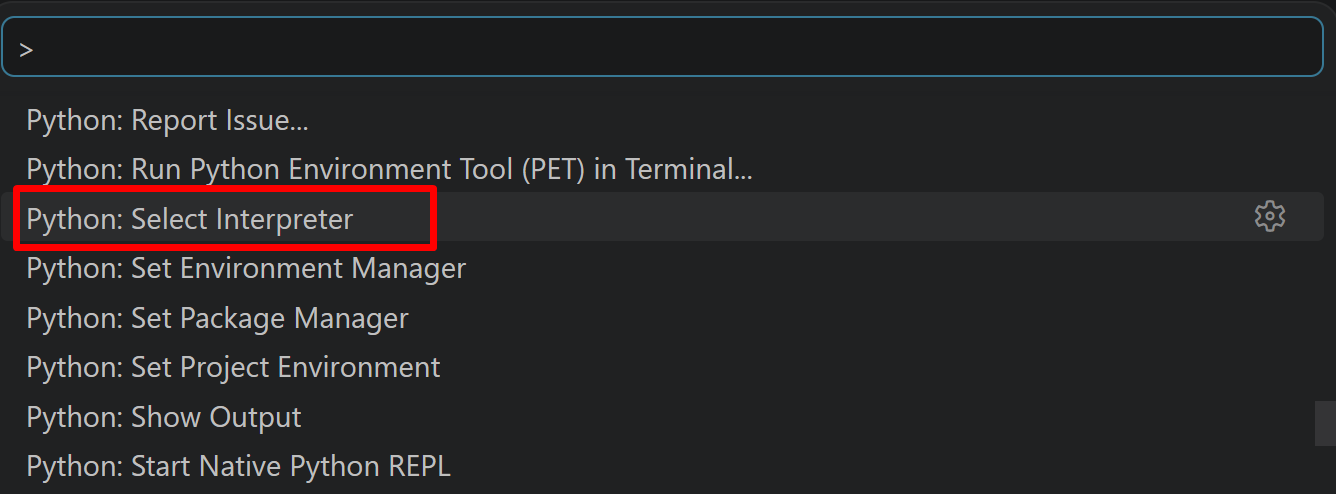
- 表示される一覧から,使用する Python(例:
C:\Program Files\Python312\python.exe)を選択する.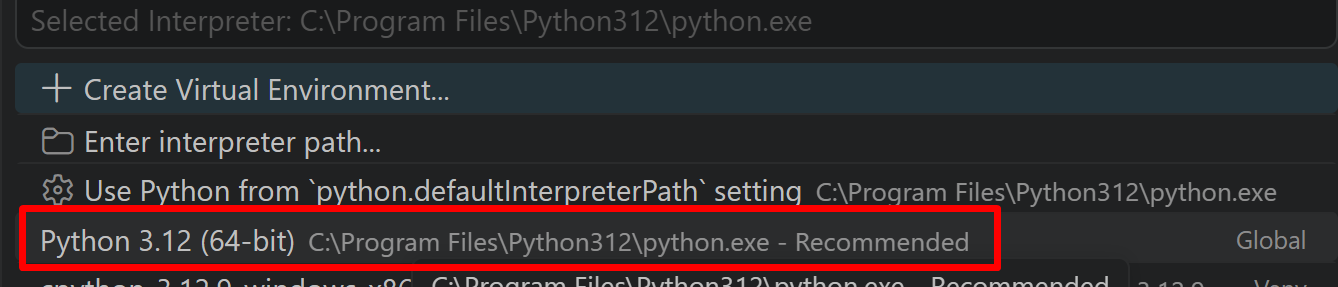
必要なライブラリをシステム領域にインストール
管理者権限でコマンドプロンプトを起動する
(手順:Windowsキーまたはスタートメニュー → cmd と入力 → 右クリック → 「管理者として実行」)。
起動したコマンドプロンプトで次を実行する。--no-user は、ユーザ領域ではなくシステム領域へインストールするオプションである。Qwen3-VLはtransformersの新しい版で対応したモデルであるため、-U を付けて最新版へ更新する。
REM PyTorch をインストール(GPU対応版)
set "CUDA_TAG=cu128"
set "PYTHON_PATH=C:\Program Files\Python312"
"%PYTHON_PATH%\Scripts\pip" install --no-user -U numpy torch torchvision torchaudio --index-url https://download.pytorch.org/whl/%CUDA_TAG%
"%PYTHON_PATH%\Scripts\pip" install --no-user -U transformers accelerate opencv-python pillow
学習済みモデルの取得
学習済みモデル(Qwen/Qwen3-VL-8B-Instruct など)は、プログラムの初回実行時にHugging Face Hubから自動でダウンロードされ、以後はキャッシュが使われる。8Bのモデルで十数GBの容量を使うため、空き容量と通信量に注意する。
第4章 Qwen3-VL による Visual Question Answering プログラム
概要
このプログラムは、画像の内容を理解し、自然言語による質問に対して回答する。画像中の物体、場面、関係性を認識し、質問の意図を理解した上で、適切な回答を生成する。
主要技術
- Qwen3-VL
画像とテキストを同時に扱う視覚言語モデルである[1]。画像をVision Transformer(画像を小片に分割して扱うニューラルネットワーク)で符号化し、その特徴を言語モデルに渡すことで、画像に関する質問への回答や画像の説明を生成する。入力画像の解像度に応じて視覚トークン数を変える設計であり、細かな文字の読み取りにも対応する。
- Interleaved-MRoPE と DeepStack
Qwen3-VLで導入された仕組みである[1]。Interleaved-MRoPEは時間・高さ・幅の位置情報を扱う位置符号化であり、DeepStackはVision Transformerの複数の層の特徴を統合して細部の情報を保つ。
参考文献
- [1] Qwen Team. (2025). Qwen3 Technical Report. arXiv preprint arXiv:2505.09388.
- [2] Bai, S., Chen, K., Liu, X., Wang, J., Ge, W., Song, S., ... & Lin, J. (2025). Qwen2.5-VL Technical Report. arXiv preprint arXiv:2502.13923.
ソースコード
# プログラム名: Qwen3-VL による Visual Question Answering プログラム
# 特徴技術名: Qwen3-VL (Qwen3 Vision-Language Model)
# 出典: Qwen Team. (2025). Qwen3 Technical Report. arXiv preprint arXiv:2505.09388. https://arxiv.org/abs/2505.09388
# 特徴機能: Vision-Language Understanding - 画像とテキストを同時に理解し、画像に関する質問に自然言語で回答。日本語を含む多言語に対応し、画像中の文字の読み取りにも対応
# 学習済みモデル:
#   - Qwen/Qwen3-VL-4B-Instruct (4Bパラメータ、軽量)
#   - Qwen/Qwen3-VL-8B-Instruct (8Bパラメータ、標準)
#   - Qwen/Qwen3-VL-32B-Instruct (32Bパラメータ、高精度)
#   URL: https://huggingface.co/Qwen/Qwen3-VL-8B-Instruct
# 方式設計:
#   - 関連利用技術:
#     - Transformers: Hugging Faceのマルチモーダル処理フレームワーク
#     - PIL: 画像処理ライブラリ
#     - PyTorch: 深層学習フレームワーク
#     - OpenCV: カメラ入力と画像表示
#   - 入力と出力:
#     入力: 1つの静止画像,カメラ(ユーザは「0:画像ファイル,1:カメラ,2:サンプル画像」のメニューで選択.0:画像ファイルの場合はtkinterでファイル選択可能.1の場合はOpenCVでカメラが開き,スペースキーで撮影.2の場合はサンプル画像URLから選択)
#     出力: 処理結果をprint()で表示.プログラム終了時にprint()で表示した処理結果をresult.txtファイルに保存
#   - 処理手順:
#     1. Qwen3-VLモデルの選択とダウンロード
#     2. 画像の取得(ファイル/カメラ/サンプル)
#     3. 画像の前処理(大きい画像のリサイズ)
#     4. チャットテンプレートで画像と質問をまとめ、モデルへ入力
#     5. 生成された回答の表示と保存
#   - 前処理、後処理:
#     前処理: 大きい画像をMAX_SIZE以下に縮小、プロセッサによる正規化とトークン化
#     後処理: 入力部分のトークンを除いて生成部分だけをデコード
#   - 追加処理: 大きな画像のリサイズ処理(処理速度向上)
#   - 調整を必要とする設定値:
#     - MAX_NEW_TOKENS: 生成する最大トークン数(20-512推奨、質問の複雑さに応じて調整)
#     - GENERATION_MODE: 0=beam search(確定的), 1=sampling(創造的)
#     - NUM_BEAMS: beam searchのビーム数(2-5推奨)
#     - TEMPERATURE: 生成の創造性(0.5-1.0推奨)
#     - TOP_P: nucleus samplingの閾値(0.8-0.95推奨)
# 将来方策: なし
# その他の重要事項: GPU推奨(CPUでも動作可能だが処理時間が長い)
# 前準備: pip install --no-user -U numpy torch torchvision torchaudio --index-url https://download.pytorch.org/whl/cu128
#         pip install --no-user -U transformers accelerate opencv-python pillow

import torch
from transformers import AutoProcessor, Qwen3VLForConditionalGeneration
import cv2
import tkinter as tk
from tkinter import filedialog
import urllib.request
from PIL import Image
import os

# 定数定義
MODELS = [
    ("Qwen/Qwen3-VL-4B-Instruct", "Qwen3-VL 4B Instruct | 軽量、GPUメモリが少ない環境向け | 多言語対応"),
    ("Qwen/Qwen3-VL-8B-Instruct", "Qwen3-VL 8B Instruct | 標準、精度と速度のバランス | 多言語対応"),
    ("Qwen/Qwen3-VL-32B-Instruct", "Qwen3-VL 32B Instruct | 高精度、大容量GPU向け | 多言語対応")
]

DEFAULT_MODEL_INDEX = 1
MAX_SIZE = 1024

# 生成パラメータ設定
MAX_NEW_TOKENS = 256  # 生成する最大トークン数(推奨: 20-512、単純な質問:50、詳細説明:200-512)
GENERATION_MODE = 0  # 0: beam search(確定的), 1: sampling(創造的)
NUM_BEAMS = 3  # beam searchのビーム数(推奨: 2-5、精度重視なら5)
TEMPERATURE = 0.8  # 生成の創造性(推奨: 0.5-1.0、低いほど確定的)
TOP_P = 0.9  # nucleus samplingの閾値(推奨: 0.8-0.95)

SAMPLE_URLS = [
    "https://raw.githubusercontent.com/opencv/opencv/master/samples/data/fruits.jpg",
    "https://raw.githubusercontent.com/opencv/opencv/master/samples/data/messi5.jpg",
    "https://raw.githubusercontent.com/opencv/opencv/master/samples/data/aero3.jpg",
    "https://upload.wikimedia.org/wikipedia/commons/3/3a/Cat03.jpg"
]

QUESTIONS = [
    "この画像で異常または興味深い点は何ですか?",
    "この画像内の物体間の空間的関係を分析してください",
    "表示されている文脈や状況について何が推察できますか?",
    "物体を特定し、その典型的な用途や意義を説明してください",
    "重要な視覚要素に焦点を当てて、この画像を詳細に説明してください",
    "この画像の構図、照明、視覚的階層を分析してください"
]

print("Qwen3-VL VQA システム")
print("概要: 画像に関する質問に対してAIが詳細な回答を生成します")
print("操作方法:")
print("  - 画像選択後、質問を入力してください")
print("  - 複数の質問が可能です")
print("  - カメラモード: スペースキーで撮影、qキーで終了")
print("注意事項: GPU推奨(初回実行時は大容量モデルのダウンロードが発生)")
print()

# GPU/CPU自動選択
device = torch.device('cuda' if torch.cuda.is_available() else 'cpu')
print(f'デバイス: {str(device)}')

# モデル選択
print("\n利用可能なQwen3-VLモデル:")
for i, (model_name, description) in enumerate(MODELS, 1):
    print(f"{i}. {description}")
print(f"Enter: デフォルト({MODELS[DEFAULT_MODEL_INDEX][1].split(' | ')[0]})を使用")

choice = input("\nモデル番号 (Enterでデフォルト): ")
if choice == "":
    model_idx = DEFAULT_MODEL_INDEX
else:
    model_idx = int(choice) - 1
model_name = MODELS[model_idx][0]
model_description = MODELS[model_idx][1].split(" | ")[0]

print(f"\n選択されたモデル: {model_description}")
print('モデルをロード中です。しばらくお待ちください...')

processor = AutoProcessor.from_pretrained(model_name)
model = Qwen3VLForConditionalGeneration.from_pretrained(
    model_name,
    dtype='auto',
    device_map='auto'
)
model.eval()

print('モデルのロードが完了しました。')

results = []

def preprocess_image(image_input):
    """画像の前処理:PIL形式への変換とリサイズ
    大きい画像は処理速度向上のためMAX_SIZE以下に縮小"""
    if isinstance(image_input, str):
        image = Image.open(image_input).convert('RGB')
    else:
        image_rgb = cv2.cvtColor(image_input, cv2.COLOR_BGR2RGB)
        image = Image.fromarray(image_rgb)

    if max(image.size) > MAX_SIZE:
        image.thumbnail((MAX_SIZE, MAX_SIZE), Image.Resampling.LANCZOS)

    return image

def generate_answer(image, question):
    """Qwen3-VLを使用して回答生成
    beam search(確定的)またはsampling(創造的)を選択可能"""
    messages = [
        {
            "role": "user",
            "content": [
                {"type": "image"},
                {"type": "text", "text": question},
            ],
        },
    ]

    text = processor.apply_chat_template(messages, tokenize=False, add_generation_prompt=True)
    inputs = processor(images=image, text=text, return_tensors="pt").to(model.device)

    with torch.no_grad():
        if GENERATION_MODE == 0:
            # Beam search: 確定的で一貫性のある回答
            outputs = model.generate(**inputs,
                                    do_sample=False,
                                    num_beams=NUM_BEAMS,
                                    max_new_tokens=MAX_NEW_TOKENS)
        else:
            # Sampling: より創造的で多様な回答
            outputs = model.generate(**inputs,
                                    do_sample=True,
                                    max_new_tokens=MAX_NEW_TOKENS,
                                    temperature=TEMPERATURE,
                                    top_p=TOP_P)

    generated_ids = [out_ids[len(in_ids):] for in_ids, out_ids in zip(inputs.input_ids, outputs)]
    generated_text = processor.batch_decode(generated_ids, skip_special_tokens=True, clean_up_tokenization_spaces=False)[0].strip()
    return generated_text

def process_image(img_input, img_path=None):
    """画像処理メイン:質問選択→回答生成→結果表示・保存"""
    image = preprocess_image(img_path or img_input)

    # 質問選択
    print("\n質問を選択:")
    for i, q in enumerate(QUESTIONS, 1):
        print(f"{i}. {q}")
    print("7. 自由入力")

    q_choice = int(input("選択: "))
    if q_choice <= 6:
        question = QUESTIONS[q_choice-1]
    else:
        question = input("質問: ")

    # 回答生成と表示
    print("回答生成中...")
    answer = generate_answer(image, question)
    result = f"\n質問: {question}\n回答: {answer}\n"
    print(result)
    results.append(result)

    # 画像表示
    display_img = cv2.imread(img_path) if img_path else img_input
    cv2.imshow('Image', display_img)
    cv2.waitKey(0)

def main():
    print("0: 画像ファイル")
    print("1: カメラ")
    print("2: サンプル画像")

    choice = input("選択: ")

    if choice == '0':
        root = tk.Tk()
        root.withdraw()
        file_paths = filedialog.askopenfilenames(
            title="画像ファイルを選択",
            filetypes=[("画像ファイル", "*.jpg *.jpeg *.png *.bmp *.tiff")]
        )
        root.destroy()

        for file_path in file_paths:
            print(f"\n処理中: {os.path.basename(file_path)}")
            process_image(None, file_path)

    elif choice == '1':
        cap = cv2.VideoCapture(0, cv2.CAP_DSHOW)
        cap.set(cv2.CAP_PROP_BUFFERSIZE, 1)
        try:
            print("\nスペースキー: 撮影して分析")
            print("Qキー: 終了")

            while True:
                ret, frame = cap.read()
                if not ret:
                    break

                cv2.imshow('Camera - Press SPACE to capture, Q to quit', frame)

                key = cv2.waitKey(1) & 0xFF
                if key == ord('q'):
                    break
                elif key == ord(' '):
                    print("\n画像を撮影しました")
                    process_image(frame.copy())
        finally:
            cap.release()

    elif choice == '2':
        print("\nサンプル画像:")
        sample_names = ["fruits.jpg", "messi5.jpg", "aero3.jpg", "Cat03.jpg"]
        for i, name in enumerate(sample_names, 1):
            print(f"{i}. {name}")

        sample_choice = int(input("選択: ")) - 1
        url = SAMPLE_URLS[sample_choice]
        filename = f"sample_{sample_choice}.jpg"

        print(f"サンプル画像をダウンロード中: {sample_names[sample_choice]}")
        urllib.request.urlretrieve(url, filename)

        process_image(None, filename)

        # 一時ファイルの自動削除
        if os.path.exists(filename):
            os.remove(filename)

    cv2.destroyAllWindows()

if __name__ == "__main__":
    main()

    # 結果保存
    if results:
        with open('result.txt', 'w', encoding='utf-8') as f:
            f.write("=== 結果 ===\n")
            f.write(f"使用モデル: {model_name}\n")
            f.write(f"デバイス: {str(device)}\n")
            f.write("=" * 50 + "\n")
            for result in results:
                f.write(result)
        print(f"\n処理結果をresult.txtに保存しました ({len(results)}件)")

    print("\nプログラムを終了します")
使い方
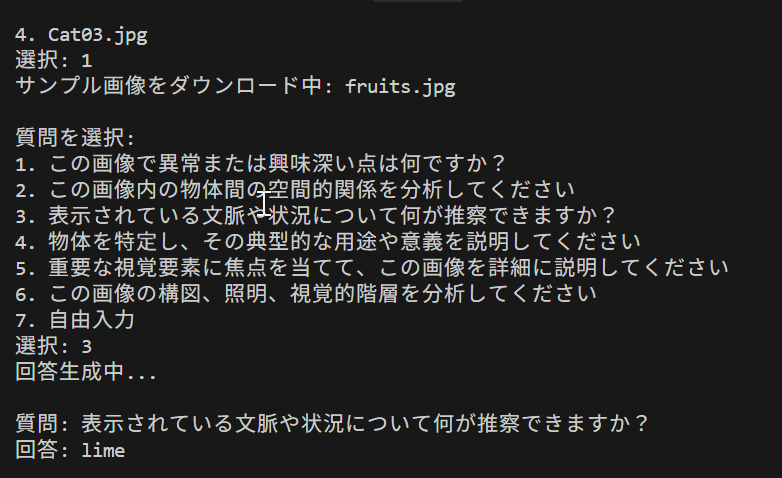
プログラムを実行すると、はじめにモデルの選択メニューが表示される。何も入力せずEnterを押すと8Bのモデルが使われる。次に入力の選択メニューが表示され、0 で画像ファイル(複数選択可)、1 でカメラ、2 でサンプル画像を選ぶ。カメラの場合はスペースキーで撮影して解析し、qキーで終了する。質問は一覧から番号で選ぶか、7 を選んで自由に入力する。回答はコンソールに表示され、画像の表示ウィンドウで何かキーを押すと次に進む。すべての回答はresult.txtに保存される。