![[kaneko lab.]](https://www.kkaneko.jp/info/logo_png.png)
VAS値・左右虹彩径・瞬き検出による計測(ソースコードと実行結果)
【概要】
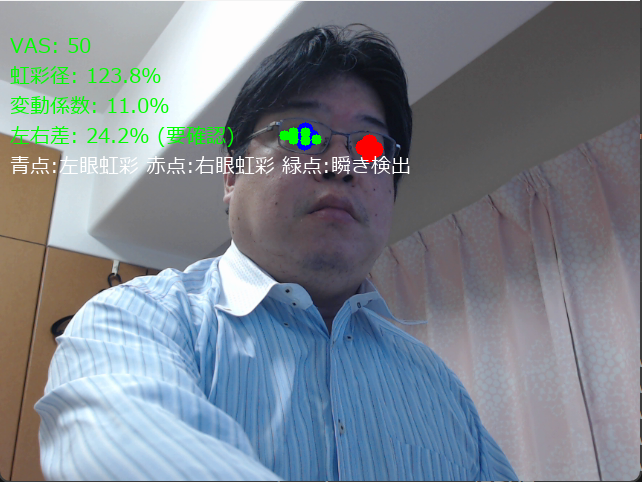
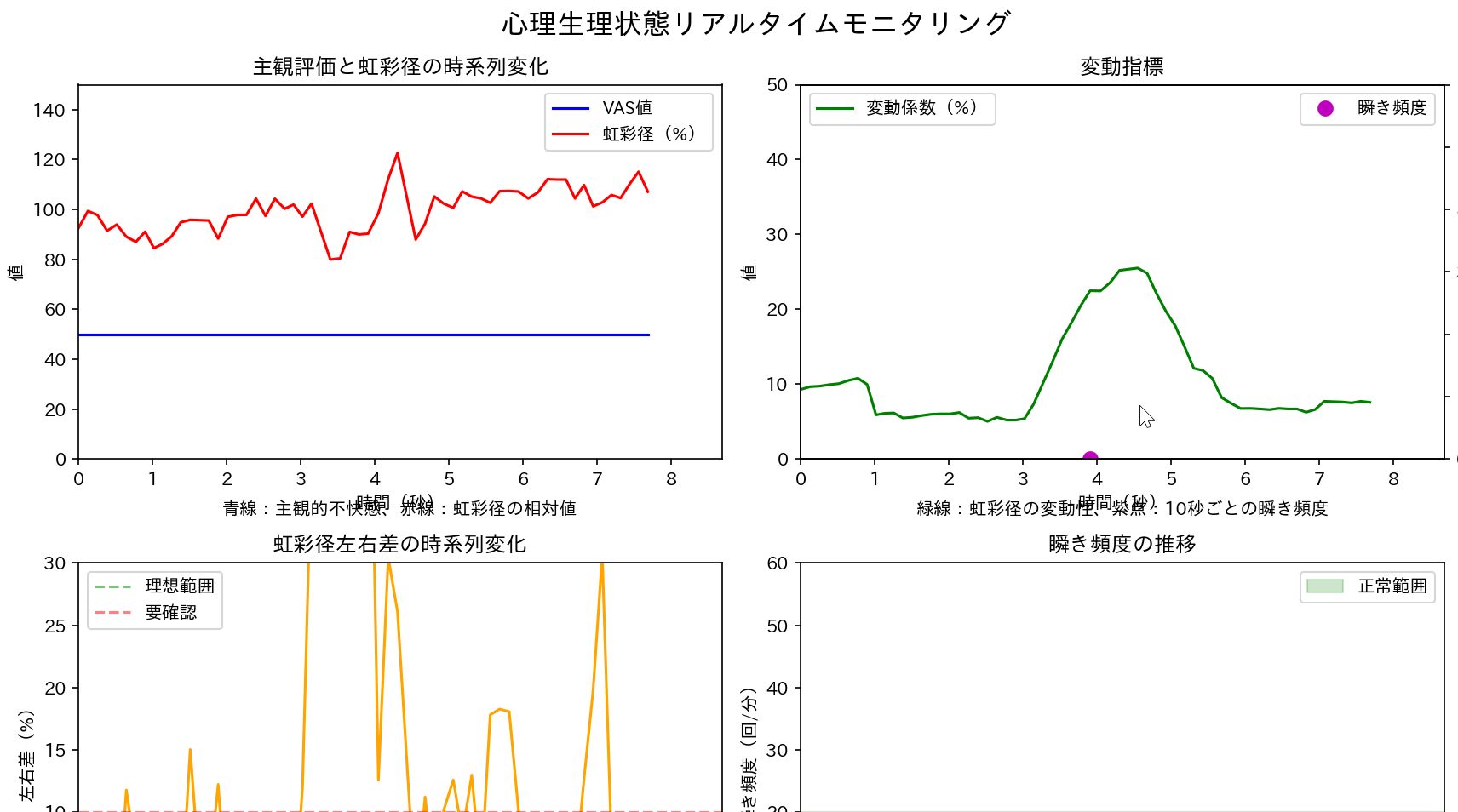
VAS値(主観評価)と、MediaPipeによる左右虹彩径・瞬きの画像計測を同時に記録し、両者の対応関係を相関分析するプログラムである。虹彩径は画像上の見かけの大きさであり、瞳孔径の測定ではない。
【目次】
第1章 Python開発環境,ライブラリ類
ここでは、最低限の事前準備について説明する。機械学習や深層学習を行う場合は、NVIDIA CUDA、Visual Studio、Cursorなどを追加でインストールすると便利である。これらについては別ページ https://www.kkaneko.jp/cc/dev/aiassist.htmlで詳しく解説しているので、必要に応じて参照してください。
Build Tools for Visual Studio 2026(ビルドツール)のインストール
Build Tools for Visual Studio 2026(ビルドツール)のインストールを行い、C/C++ コードのビルド環境を整える。
Build Tools for Visual Studio は,Visual Studio の IDE を含まない C/C++ コンパイラ,ライブラリ,ビルドツール等のコマンドライン向け開発ツールセットである。インストール済みの場合,この手順は不要である。 以下のコマンドは、Build Tools が未インストールの場合は winget で新規インストールし、インストール済みの場合は 【インストールコマンドの実行方法】 管理者権限でコマンドプロンプトを起動する(手順:Windows キーまたはスタートメニュー → 上記のコマンドでは、Build Tools 本体と Visual C++ 再頒布可能パッケージをインストールし、続いて以下のコンポーネントを追加している。 追加のコンポーネントが必要になった場合は Visual Studio Installer で個別にインストールできる。 インストール完了の確認 Visual Studio を必要とするとき Visual Studio の機能を必要とする場合は,追加インストールできる。[Build Tools for Visual Studio 2026(ビルドツール)のインストール手順を見るには、ここをクリック]
Windows での Build Tools for Visual Studio 2026 のインストール
setup.exe modify でコンポーネントを追加する(バージョンは変更しない)。cmd と入力 → 右クリック → 「管理者として実行」)。そして、コマンド全体をコマンドプロンプトにコピー&ペーストする。REM ============================================================
REM Visual C++ 再頒布可能パッケージ (VCRedist 2015-)
REM ============================================================
winget install --scope machine --id Microsoft.VCRedist.2015+.x64 -e --silent --disable-interactivity --force --accept-source-agreements --accept-package-agreements --override "/quiet /norestart"
if not "%ERRORLEVEL%"=="0" ( color 0c & echo VCRedist のインストールに失敗しました & ping 127.0.0.1 -n 6 >nul & color )
REM ============================================================
REM Visual Studio Build Tools + Desktop development with C++
REM (VCTools、MSBuildTools、CMake連携、Clang、Windows 11 SDK)
REM ============================================================
REM 進行中のインストーラーを停止(ロック競合回避。対象プロセスが存在しない場合は
REM taskkillがエラーを返すが、これは想定内であるため出力のみ抑制する)
taskkill /F /IM vs_setup.exe /T >nul 2>&1
taskkill /F /IM vs_installer.exe /T >nul 2>&1
taskkill /F /IM vs_installerservice.exe /T >nul 2>&1
taskkill /F /IM msiexec.exe /T >nul 2>&1
REM Build Tools + Desktop development with C++(VCTools)+ 追加コンポーネント(一括)
REM 未インストール時: winget で新規インストール
REM インストール済み時: setup.exe modify でコンポーネント追加(バージョンは変更しない)
winget list --id Microsoft.VisualStudio.BuildTools 2>nul | findstr /i "BuildTools" >nul 2>&1
if %ERRORLEVEL% EQU 0 (
for /f "usebackq delims=" %P in (`"C:\Program Files (x86)\Microsoft Visual Studio\Installer\vswhere.exe" -products Microsoft.VisualStudio.Product.BuildTools -property installationPath`) do start /wait "" "C:\Program Files (x86)\Microsoft Visual Studio\Installer\setup.exe" modify --installPath "%P" --add Microsoft.VisualStudio.Workload.VCTools --add Microsoft.VisualStudio.Workload.MSBuildTools --add Microsoft.VisualStudio.Component.VC.CMake.Project --add Microsoft.VisualStudio.Component.VC.Llvm.Clang --add Microsoft.VisualStudio.Component.VC.Llvm.ClangToolset --add Microsoft.VisualStudio.Component.Windows11SDK.26100 --add Microsoft.VisualStudio.Component.VC.v143.x86.x64 --includeRecommended --quiet --norestart --nocache
if not "%ERRORLEVEL%"=="0" ( color 0c & echo Build Tools のコンポーネント追加に失敗しました & ping 127.0.0.1 -n 6 >nul & color )
) else (
winget install --scope machine --id Microsoft.VisualStudio.BuildTools -e --silent --disable-interactivity --force --accept-source-agreements --accept-package-agreements --override "--quiet --wait --norestart --nocache --add Microsoft.VisualStudio.Workload.VCTools --includeRecommended --add Microsoft.VisualStudio.Workload.MSBuildTools --add Microsoft.VisualStudio.Component.VC.CMake.Project --add Microsoft.VisualStudio.Component.VC.Llvm.Clang --add Microsoft.VisualStudio.Component.VC.Llvm.ClangToolset --add Microsoft.VisualStudio.Component.Windows11SDK.26100 --add Microsoft.VisualStudio.Component.VC.v143.x86.x64"
if not "%ERRORLEVEL%"=="0" ( color 0c & echo Build Tools のインストールに失敗しました & ping 127.0.0.1 -n 6 >nul & color )
)
REM
REM BuildTools のインストールパスを vswhere.exe で取得(メジャーバージョンに依存しない)
set "VSWHERE=C:\Program Files (x86)\Microsoft Visual Studio\Installer\vswhere.exe"
set "BT_PATH="
for /f "usebackq delims=" %P in (`"%VSWHERE%" -products Microsoft.VisualStudio.Product.BuildTools -property installationPath`) do set "BT_PATH=%P"
if not defined BT_PATH ( color 0c & echo Build Tools のインストールパスを取得できませんでした & ping 127.0.0.1 -n 6 >nul & color )
REM 破損時の修復(任意、動作がおかしくなった場合)
REM if defined BT_PATH "C:\Program Files (x86)\Microsoft Visual Studio\Installer\setup.exe" repair --installPath "%BT_PATH%" --quiet --norestart
REM 導入確認(インストールパスが表示されれば正常)
"%VSWHERE%" -products * -requires Microsoft.VisualStudio.Workload.VCTools -property installationPath
--includeRecommended により、MSVC コンパイラ、C++ AddressSanitizer、vcpkg、CMake ツール、Windows 11 SDK 等の推奨コンポーネントが含まれる)winget list Microsoft.VisualStudio.BuildTools
Python 3.12 のインストール
Pythonのインストールを行い、Pythonのプログラムを実行する環境を整える。扱う環境は、Windows搭載パソコンである。金子研究室では、Python 3.12.10を推奨する。
[Windows での Python 3.12 のインストール手順を見るには、ここをクリック]
Windows での Python 3.12 のインストール
以下のいずれかの方法でPython 3.12をインストールする。Pythonがインストール済みの場合、この手順は不要である。
方法 1:winget によるインストール
【インストールコマンドの実行方法】
管理者権限でコマンドプロンプトを起動する(手順:Windowsキーまたはスタートメニュー → cmd と入力 → 右クリック → 「管理者として実行」)。そして、コマンド全体をコマンドプロンプトにコピー&ペーストする。
--scope machine を指定することで、システム全体(全ユーザー向け)にインストールされる。このオプションの実行には管理者権限が必要である。インストール完了後、コマンドプロンプトを再起動するとPATHが反映される。
REM Python 3.12 をシステム領域にインストール
winget install --id Python.Python.3.12 -e --scope machine --silent --accept-source-agreements --accept-package-agreements --override "/quiet InstallAllUsers=1 PrependPath=1 Include_test=0 Include_pip=1 Include_launcher=1 InstallLauncherAllUsers=1 TargetDir=\"C:\Program Files\Python312\""
if not "%ERRORLEVEL%"=="0" ( color 0c & echo Python 3.12 のインストールに失敗しました & ping 127.0.0.1 -n 6 >nul & color )

REM Python と Scripts を PATH 先頭に追加
powershell -NoProfile -Command "$p='C:\Program Files\Python312'; $s=\"$p\Scripts\"; if(Test-Path $p){$k=[Microsoft.Win32.Registry]::LocalMachine.OpenSubKey('SYSTEM\CurrentControlSet\Control\Session Manager\Environment',$true); $c=$k.GetValue('Path','',[Microsoft.Win32.RegistryValueOptions]::DoNotExpandEnvironmentNames); $t=$k.GetValueKind('Path'); $new=$c; if((';'+$new+';') -notlike \"*;$p;*\"){$new=$p+';'+$new}; if((';'+$new+';') -notlike \"*;$s;*\"){$new=$s+';'+$new}; if($new -ne $c){$k.SetValue('Path',$new,$t)}; $k.Close()}"

REM 現在のセッションにも反映(システムPATHを再取得して連結)
for /f "usebackq tokens=2,*" %A in (`reg query "HKLM\SYSTEM\CurrentControlSet\Control\Session Manager\Environment" /v Path`) do set "PATH=%B"

REM pip / wheel の更新
python -m pip install --no-user -U pip wheel
if not "%ERRORLEVEL%"=="0" ( color 0c & echo pip / wheel の更新に失敗しました & ping 127.0.0.1 -n 6 >nul & color )
方法 2:インストーラーによるインストール
- Python公式サイト(https://www.python.org/downloads/)にアクセスし、「Download Python 3.x.x」ボタンからWindows用インストーラーをダウンロードする。
- ダウンロードしたインストーラーを実行する。
- 初期画面の下部に表示される「Add python.exe to PATH」にチェックを入れてから「Customize installation」を選択する。このチェックを入れ忘れると、コマンドプロンプトから
pythonコマンドを実行できない。 - 「Install Python 3.xx for all users」にチェックを入れ、「Install」をクリックする。
インストールの確認
コマンドプロンプトで以下を実行する。
python --versionバージョン番号(例:Python 3.12.x)が表示されればインストール成功である。「'python' は、内部コマンドまたは外部コマンドとして認識されていません。」と表示される場合は、インストールが正常に完了していない。
Python の開発環境 Visual Studio Code のインストールと Python 用の設定
Python の開発環境Visual Studio Code(プログラムを編集するソフトウェア。以下、VS Code)を整える。
[Windows での Visual Studio Code のインストールと Python 用の設定手順を見るには、ここをクリック]
Windows での Visual Studio Code のインストールと Python 用の設定手順
1. VS Code と拡張機能のインストール
以下のコマンドにより,既存の VS Code を削除し,全ユーザー共有の設定で再インストールしたうえで,拡張機能(VS Code に機能を追加するソフトウェア)をまとめて導入する.
【インストールコマンドの実行方法】
管理者権限でコマンドプロンプトを起動する(手順:Windows キーまたはスタートメニュー → cmd と入力 → 右クリック → 「管理者として実行」)。そして,コマンド全体をコマンドプロンプトにコピー&ペーストする。
インストールコマンド
REM ============================================================
REM Microsoft Visual Studio Code
REM ============================================================
REM Build Tools + Desktop development with C++(VCTools)+ 追加コンポーネント(一括)
REM 未インストール時: winget で新規インストール
REM インストール済み時: setup.exe modify でコンポーネント追加(バージョンは変更しない)
winget list --id Microsoft.VisualStudio.BuildTools 2>nul | findstr /i "BuildTools" >nul 2>&1
if %ERRORLEVEL% EQU 0 (
    for /f "usebackq delims=" %P in (`"C:\Program Files (x86)\Microsoft Visual Studio\Installer\vswhere.exe" -products Microsoft.VisualStudio.Product.BuildTools -property installationPath`) do start /wait "" "C:\Program Files (x86)\Microsoft Visual Studio\Installer\setup.exe" modify --installPath "%P" --add Microsoft.VisualStudio.Workload.VCTools --add Microsoft.VisualStudio.Workload.MSBuildTools --add Microsoft.VisualStudio.Component.VC.CMake.Project --add Microsoft.VisualStudio.Component.VC.Llvm.Clang --add Microsoft.VisualStudio.Component.VC.Llvm.ClangToolset --add Microsoft.VisualStudio.Component.Windows11SDK.26100 --add Microsoft.VisualStudio.Component.VC.v143.x86.x64 --includeRecommended --quiet --norestart --nocache
    if not "%ERRORLEVEL%"=="0" ( color 0c & echo Build Tools のコンポーネント追加に失敗しました & ping 127.0.0.1 -n 6 >nul & color )
) else (
    winget install --scope machine --id Microsoft.VisualStudio.BuildTools -e --silent --disable-interactivity --force --accept-source-agreements --accept-package-agreements --override "--quiet --wait --norestart --nocache --add Microsoft.VisualStudio.Workload.VCTools --includeRecommended --add Microsoft.VisualStudio.Workload.MSBuildTools --add Microsoft.VisualStudio.Component.VC.CMake.Project --add Microsoft.VisualStudio.Component.VC.Llvm.Clang --add Microsoft.VisualStudio.Component.VC.Llvm.ClangToolset --add Microsoft.VisualStudio.Component.Windows11SDK.26100 --add Microsoft.VisualStudio.Component.VC.v143.x86.x64"
    if not "%ERRORLEVEL%"=="0" ( color 0c & echo Build Tools のインストールに失敗しました & ping 127.0.0.1 -n 6 >nul & color )
)

REM 全ユーザー共有の拡張機能フォルダ
if not exist "C:\ProgramData\vscode-extensions" mkdir "C:\ProgramData\vscode-extensions"
icacls "C:\ProgramData\vscode-extensions" /grant "Everyone:(OI)(CI)M" /T

REM スタートメニューのショートカットを --extensions-dir 付きで再作成
if exist "C:\ProgramData\Microsoft\Windows\Start Menu\Programs\Visual Studio Code" rmdir /s /q "C:\ProgramData\Microsoft\Windows\Start Menu\Programs\Visual Studio Code"
if exist "C:\ProgramData\Microsoft\Windows\Start Menu\Programs\Visual Studio Code.lnk" del "C:\ProgramData\Microsoft\Windows\Start Menu\Programs\Visual Studio Code.lnk"
powershell -NoProfile -Command "$s=New-Object -ComObject WScript.Shell; $lnk=$s.CreateShortcut('C:\ProgramData\Microsoft\Windows\Start Menu\Programs\Visual Studio Code.lnk'); $lnk.TargetPath='C:\Program Files\Microsoft VS Code\Code.exe'; $lnk.Arguments='--extensions-dir \"C:\ProgramData\vscode-extensions\"'; $lnk.Save()"
REM ショートカットの検証
powershell -NoProfile -Command "$s=New-Object -ComObject WScript.Shell; $lnk=$s.CreateShortcut('C:\ProgramData\Microsoft\Windows\Start Menu\Programs\Visual Studio Code.lnk'); Write-Host 'TargetPath:' $lnk.TargetPath; Write-Host 'Arguments:' $lnk.Arguments"

REM ファイル / フォルダ右クリックの「Code で開く」を登録
reg add "HKLM\SOFTWARE\Classes\*\shell\VSCode\command" /ve /d "\"C:\Program Files\Microsoft VS Code\Code.exe\" --extensions-dir \"C:\ProgramData\vscode-extensions\" \"%1\"" /f
reg add "HKLM\SOFTWARE\Classes\Directory\shell\VSCode\command" /ve /d "\"C:\Program Files\Microsoft VS Code\Code.exe\" --extensions-dir \"C:\ProgramData\vscode-extensions\" \"%1\"" /f
reg add "HKLM\SOFTWARE\Classes\Directory\Background\shell\VSCode\command" /ve /d "\"C:\Program Files\Microsoft VS Code\Code.exe\" --extensions-dir \"C:\ProgramData\vscode-extensions\" \"%V\"" /f

REM --extensions-dir 付きで起動する code.cmd ラッパを作成
REM (%* を echo で書くと対話的 cmd で失われるため、PowerShell で [char]37+'*' を書き出す)
powershell -NoProfile -Command "$pct=[char]37; $q=[char]34; $c='@echo off'+[char]13+[char]10+$q+'C:\Program Files\Microsoft VS Code\bin\code.cmd'+$q+' --extensions-dir '+$q+'C:\ProgramData\vscode-extensions'+$q+' '+$pct+'*'+[char]13+[char]10; [IO.File]::WriteAllText('C:\ProgramData\vscode-extensions\vscode.cmd',$c,[Text.Encoding]::ASCII)"

REM 拡張機能のインストール
set "CODE=C:\Program Files\Microsoft VS Code\bin\code.cmd"
"%CODE%" --extensions-dir "C:\ProgramData\vscode-extensions" --uninstall-extension GitHub.copilot
"%CODE%" --extensions-dir "C:\ProgramData\vscode-extensions" --uninstall-extension GitHub.copilot-chat
"%CODE%" --extensions-dir "C:\ProgramData\vscode-extensions" --install-extension ms-python.python
"%CODE%" --extensions-dir "C:\ProgramData\vscode-extensions" --install-extension ms-python.vscode-pylance
"%CODE%" --extensions-dir "C:\ProgramData\vscode-extensions" --install-extension ms-python.debugpy
"%CODE%" --extensions-dir "C:\ProgramData\vscode-extensions" --install-extension MS-CEINTL.vscode-language-pack-ja
"%CODE%" --extensions-dir "C:\ProgramData\vscode-extensions" --install-extension saoudrizwan.claude-dev
"%CODE%" --extensions-dir "C:\ProgramData\vscode-extensions" --install-extension rust-lang.rust-analyzer
"%CODE%" --extensions-dir "C:\ProgramData\vscode-extensions" --install-extension tamasfe.even-better-toml
"%CODE%" --extensions-dir "C:\ProgramData\vscode-extensions" --install-extension anthropic.claude-code
"%CODE%" --extensions-dir "C:\ProgramData\vscode-extensions" --install-extension almenon.arepl
"%CODE%" --extensions-dir "C:\ProgramData\vscode-extensions" --list-extensions --show-versions

REM settings.json を作成(自動更新オフ、Python、Claude Code 設定)
if not exist "%APPDATA%\Code\User" mkdir "%APPDATA%\Code\User"
python -c "import json,os;data={'update.mode':'none','update.enableWindowsBackgroundUpdates':False,'extensions.autoUpdate':False,'python.defaultInterpreterPath':r'C:\Program Files\Python312\python.exe','claudeCode.environmentVariables':[{'name':'ANTHROPIC_API_KEY','value':'not-needed'},{'name':'ANTHROPIC_AUTH_TOKEN','value':'ollama'},{'name':'ANTHROPIC_BASE_URL','value':'http://localhost:11434'},{'name':'ANTHROPIC_MODEL','value':'glm-4.7-flash'},{'name':'CLAUDE_CODE_DISABLE_NONESSENTIAL_TRAFFIC','value':'1'}]};p=os.path.join(os.environ['APPDATA'],'Code','User','settings.json');open(p,'w',encoding='utf-8').write(json.dumps(data,indent=4));print('Done:',p)"

REM 自動更新の抑止ポリシー(settings.json に加えて、レジストリ側でも明示的にオフ)
reg add "HKLM\SOFTWARE\Policies\Microsoft\VSCode" /v "UpdateMode" /t REG_SZ /d "none" /f
echo === セットアップ完了 ===
2. Python インタプリタの選択
同一マシンに複数の Python がインストールされている場合,VS Code で使用する Python 本体(インタプリタ:Python プログラムを解釈・実行するソフトウェア)を選択する必要がある.
- コマンドパレット(コマンド名で機能を呼び出す VS Code の入力欄)を開く(
Ctrl+Shift+P) Python: Select Interpreterと入力する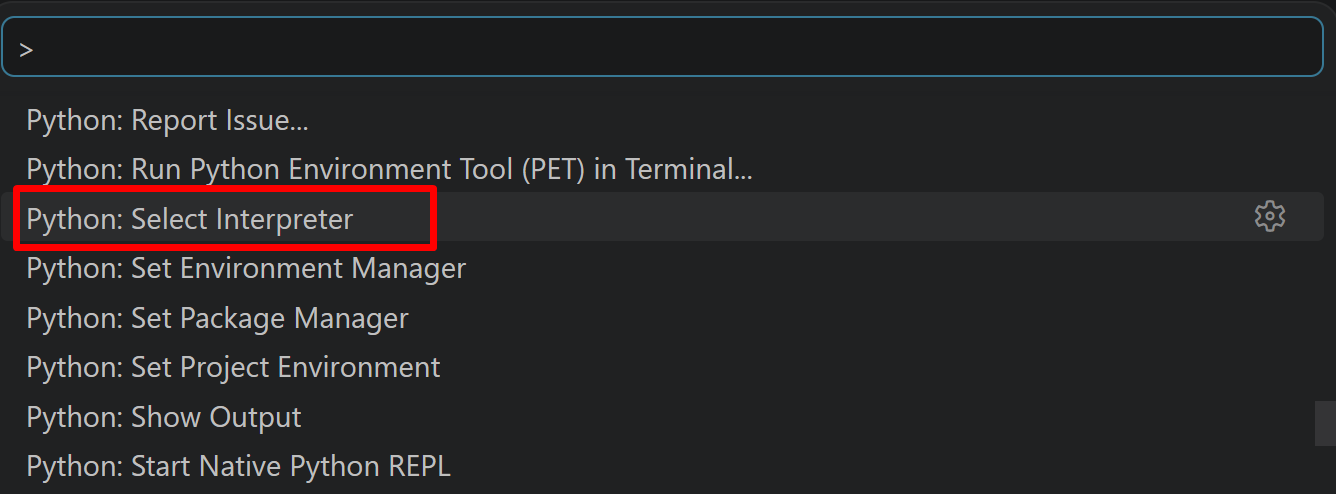
- 表示される一覧から,使用する Python(例:
C:\Program Files\Python312\python.exe)を選択する.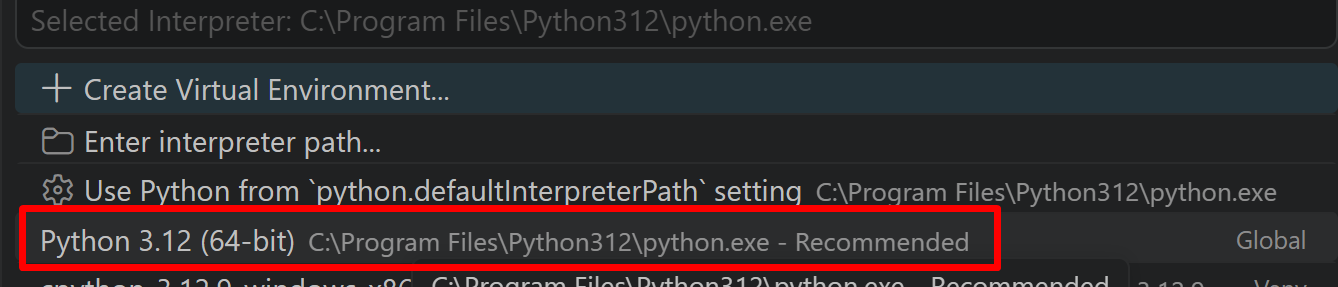
必要なライブラリのインストール
管理者権限でコマンドプロンプトを起動する
(手順:Windowsキーまたはスタートメニュー → cmd と入力 → 右クリック → 「管理者として実行」)。
以下のコマンドを実行する。
pip install -U --no-user opencv-python mediapipe numpy matplotlib scipy pillow
グラフの日本語表示には、プログラム内でmatplotlibのrcParamsにWindows標準の日本語フォント(Meiryo)を指定している。日本語化用の追加パッケージは不要である。
第2章 VAS値・左右虹彩径・瞬き検出による計測プログラム
本プログラムは、VAS(Visual Analog Scale)による主観評価をスライダーで入力しながら、カメラ映像から左右の虹彩径と瞬きを計測し、両者の対応関係を相関分析する。虹彩径はMediaPipeの虹彩ランドマークに楕円をフィッティングして求めた画像上の見かけの大きさであり、実寸やその生理的変化ではない。カメラとの距離、顔の向き、ランドマーク推定の誤差が値に影響する。
# VAS値・左右虹彩径・瞬き検出による同時計測プログラム
# 計測データ:
#   - VAS(Visual Analog Scale)値:0-100の主観的評価
#   - 左右虹彩径:画像上の見かけの径。個別に計測し、初期フレームの値で正規化
#   - 虹彩径左右差:パーセンテージ
#   - 虹彩径変動係数:測定値のばらつきの指標
#   - 瞬き検出:EARによる検出(発生時刻を記録)
#   - 瞬き頻度:約10秒ごとの回数を分あたりに換算
# 使用技術: MediaPipe Face Landmarker(新API)の虹彩ランドマーク
#           https://ai.google.dev/edge/mediapipe/solutions/vision/face_landmarker
# 学習済みモデル: face_landmarker.task(float16版、約3.7MB、478顔ランドマーク)
# 利用制限: Apache License 2.0
#           https://github.com/google-ai-edge/mediapipe/blob/master/LICENSE
# 方式設計:
#   - 入力: カメラ映像、VASスライダー入力(0-100)
#   - 出力: 画面表示、グラフ表示、結果ファイル(result.txt)
#   - 処理手順: 顔画像取得→ランドマーク検出→虹彩径計測→統計処理→表示
#   - 前処理: 顔検出・追跡の信頼度閾値(0.5)によるフィルタリング
#   - 後処理: 直近10フレームの履歴に基づく正規化と変動係数の算出
# 制約事項:
#   1. 本プログラムが計測するのは画像上の虹彩径であり、瞳孔径ではない
#   2. カメラとの距離や顔の向きが変わると計測値が変化する
#   3. 相関分析のp値は、フレーム間でデータが独立でない(自己相関がある)ため参考値である
#   4. cv2.CAP_DSHOW、フォントのパス指定はWindows環境向けである
# 前準備: pip install -U --no-user opencv-python mediapipe numpy matplotlib scipy pillow

import cv2
import tkinter as tk
from collections import deque
import time
import os
import urllib.request
import matplotlib
import matplotlib.pyplot as plt
import numpy as np
from scipy import stats
from PIL import Image, ImageDraw, ImageFont
from datetime import datetime

# MediaPipe新API
import mediapipe as mp
from mediapipe.tasks import python
from mediapipe.tasks.python import vision

# matplotlibの日本語表示設定(Windows標準フォント)
matplotlib.rcParams['font.family'] = 'Meiryo'
matplotlib.rcParams['axes.unicode_minus'] = False

# プログラム起動直後の解説表示
print('========== VAS値・左右虹彩径・瞬き検出による同時計測プログラム ==========')
print()
print('【プログラム概要】')
print('Visual Analog Scale(VAS)による主観評価と、')
print('画像計測による虹彩径・瞬きのデータを同時に記録し、')
print('両者の対応関係を相関分析します。')
print()
print('【Visual Analog Scale (VAS) について】')
print()
print('VASは医療・心理学分野で用いられる主観的評価尺度です。')
print('連続的な線分上で対象者が自身の状態を示すことで、')
print('痛み、不快感などの主観的体験を数値化します。')
print()
print('VASの特徴:')
print('- 0から100の連続尺度による評価')
print('- 言語による段階分けをせずに評価できる')
print('- 同一人物の時系列変化の追跡に用いられる')
print('- 個人間の絶対値の比較には注意が必要(尺度の使い方に個人差がある)')
print()
print('【同時記録するデータの組み合わせ】')
print()
print('本プログラムは、VAS(主観評価)と以下の画像計測値の対応を分析します。')
print('相関は関連の有無を示すもので、因果関係は示しません。')
print()
print('1. VAS値 × 虹彩径(正規化値)')
print('2. VAS値 × 虹彩径変動係数')
print('3. VAS値 × 瞬き頻度')
print('4. VAS値 × 虹彩径左右差')
print('5. 虹彩径変動係数 × 瞬き頻度')
print()
print('【計測項目の説明】')
print()
print('1. 虹彩径(画像上の見かけの径)')
print('   虹彩ランドマーク5点に楕円をフィッティングし、長軸と短軸の平均を径とします。')
print('   - 角膜横径(white-to-white)は成人で約11.7mm前後と報告されており、')
print('     個人間の差は瞳孔径よりも小さい')
print('   - 虹彩そのものの大きさは照明では変わらないため、計測値の変化は')
print('     主にカメラとの距離、顔の向き、ランドマーク推定の誤差に由来する')
print('   - 初期の10フレームの平均を基準(100%)として正規化する')
print()
print('2. 虹彩径左右差')
print('   (|左眼径-右眼径|)/平均径×100 で算出します。')
print('   本プログラムでは5%以下、10%以下、それ以上で表示を分けています。')
print('   この区分は計測の安定性を目視で確認するための設定値です。')
print('   顔が斜めを向くと左右差は大きくなります。')
print()
print('3. 虹彩径変動係数(CV)')
print('   標準偏差/平均×100。直近フレームの計測値のばらつきを表します。')
print()
print('4. 瞬き検出と瞬き頻度')
print('   Eye Aspect Ratio(EAR)が閾値0.2を下回った時点を瞬きとして数え、')
print('   約10秒ごとに分あたりに換算します。')
print('   既存研究では、健常者の瞬き回数は安静時に平均約17回/分、')
print('   会話時に約26回/分、読書時に約4.5回/分と報告されています。')
print('   個人差と課題による差が大きいため、同一人物の条件間比較に用います。')
print()
print('【測定上の注意】')
print('1. 照明を一定に保ち、カメラとの距離と顔の向きを変えないようにする')
print('2. 開始後の最初の10フレームは基準値の設定に使われるため、正面を向いて静止する')
print('3. 眼鏡の反射や色付きコンタクトレンズは虹彩ランドマークの推定に影響することがある')
print('4. 本プログラムが計測するのは画像上の虹彩径であり、瞳孔径ではない')
print()
print('=' * 50)
print()

# モデル情報
MODEL_URL = 'https://storage.googleapis.com/mediapipe-models/face_landmarker/face_landmarker/float16/latest/face_landmarker.task'
MODEL_PATH = 'face_landmarker.task'
CONF_THRESH = 0.5

# モデルダウンロード
if not os.path.exists(MODEL_PATH):
    print('モデルをダウンロード中...')
    try:
        urllib.request.urlretrieve(MODEL_URL, MODEL_PATH)
        print('ダウンロード完了')
    except Exception as e:
        print(f'ダウンロード失敗: {e}')
        raise SystemExit(1)

# MediaPipe Face Landmarker初期化(新API)
base_options = python.BaseOptions(model_asset_path=MODEL_PATH)
options = vision.FaceLandmarkerOptions(
    base_options=base_options,
    running_mode=vision.RunningMode.VIDEO,
    num_faces=1,
    min_face_detection_confidence=CONF_THRESH,
    min_face_presence_confidence=CONF_THRESH,
    min_tracking_confidence=CONF_THRESH,
    output_face_blendshapes=False,
    output_facial_transformation_matrixes=False
)
face_landmarker = vision.FaceLandmarker.create_from_options(options)
print('MediaPipe Face Landmarker初期化完了(新API, ランドマーク数: 478点)')
print()

# グローバル変数
vas_value = 50
left_iris_sizes = deque(maxlen=10)   # 虹彩径の履歴
right_iris_sizes = deque(maxlen=10)  # 虹彩径の履歴
normalized_left_sizes = deque(maxlen=10)
normalized_right_sizes = deque(maxlen=10)
baseline_left_iris_size = None   # 基準虹彩径
baseline_right_iris_size = None  # 基準虹彩径
last_ear = 1.0
blink_threshold = 0.2
last_blink_analysis_time = time.time()
blink_count_10sec = 0
running = True  # プログラム実行フラグ
frame_count = 0
results_log = []

# グラフ用データ
time_data = deque(maxlen=60)
vas_data_graph = deque(maxlen=60)
iris_data = deque(maxlen=60)
cv_data = deque(maxlen=60)
lr_diff_data = deque(maxlen=60)
blink_freq_data = []
blink_freq_time = []

# 分析用データ(全期間)
all_vas_data = []
all_iris_data = []
all_cv_data = []
all_lr_diff_data = []
all_blink_freq_data = []
all_time_stamps = []

# 日本語フォント初期化(Windows)
FONT_PATH = 'C:/Windows/Fonts/meiryo.ttc'
FONT_SIZE = 16
try:
    font = ImageFont.truetype(FONT_PATH, FONT_SIZE)
    use_japanese_font = True
except Exception:
    font = None
    use_japanese_font = False
    print('日本語フォントの読み込みに失敗しました。英語表示のみ行います')

# 虹彩ランドマークインデックス(MediaPipeのモデル定義上の左右)
# 468が右眼虹彩の中心、469-472が右眼虹彩の輪郭
# 473が左眼虹彩の中心、474-477が左眼虹彩の輪郭
RIGHT_IRIS_IDX = [468, 469, 470, 471, 472]
LEFT_IRIS_IDX = [473, 474, 475, 476, 477]

# 瞬き検出用(EAR計算)のランドマーク
EAR_EYE_IDX = [33, 160, 158, 133, 153, 144]

def create_vas_window():
    root = tk.Tk()
    root.title('VAS入力')
    root.geometry('400x100')

    def update_vas(val):
        global vas_value
        vas_value = int(float(val))

    def on_closing():
        global running
        running = False
        root.quit()

    scale = tk.Scale(root, from_=0, to=100, orient=tk.HORIZONTAL,
                     length=350, command=update_vas)
    scale.set(50)
    scale.pack(pady=20)

    label = tk.Label(root, text='0: 全く問題なし  100: 最大の不快感')
    label.pack()

    root.protocol("WM_DELETE_WINDOW", on_closing)

    return root

def compute_iris_size(indices, landmarks, image_width, image_height):
    # 楕円フィッティングによる虹彩径の推定
    points = []
    for idx in indices:
        if idx < len(landmarks):
            x = int(landmarks[idx].x * image_width)
            y = int(landmarks[idx].y * image_height)
            points.append([x, y])

    iris_size = 0
    if len(points) >= 5:
        points = np.array(points)
        # 楕円フィッティング
        ellipse = cv2.fitEllipse(points)
        # 楕円の長軸と短軸の平均を径とする
        iris_size = (ellipse[1][0] + ellipse[1][1]) / 2
    return iris_size

def calculate_iris_size_bilateral(landmarks, image_width, image_height):
    left_iris_size = compute_iris_size(LEFT_IRIS_IDX, landmarks, image_width, image_height)
    right_iris_size = compute_iris_size(RIGHT_IRIS_IDX, landmarks, image_width, image_height)
    return left_iris_size, right_iris_size

def calculate_ear(landmarks):
    """EAR(正規化座標のまま計算:比であるため座標系の違いは影響しない)"""
    points = []
    for idx in EAR_EYE_IDX:
        if idx < len(landmarks):
            points.append([landmarks[idx].x, landmarks[idx].y])

    if len(points) == 6:
        points = np.array(points)
        # 垂直距離
        vertical_1 = np.linalg.norm(points[1] - points[5])
        vertical_2 = np.linalg.norm(points[2] - points[4])
        # 水平距離
        horizontal = np.linalg.norm(points[0] - points[3])

        if horizontal > 0:
            ear = (vertical_1 + vertical_2) / (2.0 * horizontal)
            return ear
    return 1.0

def video_frame_processing(frame, timestamp_ms):
    global frame_count, vas_value, last_ear, blink_count_10sec
    global left_iris_sizes, right_iris_sizes, normalized_left_sizes, normalized_right_sizes
    global baseline_left_iris_size, baseline_right_iris_size
    global last_blink_analysis_time
    global time_data, vas_data_graph, iris_data, cv_data, lr_diff_data
    global blink_freq_data, blink_freq_time
    global all_vas_data, all_iris_data, all_cv_data, all_lr_diff_data
    global all_blink_freq_data, all_time_stamps

    current_time = time.time()
    frame_count += 1

    # MediaPipe Image形式に変換
    mp_image = mp.Image(image_format=mp.ImageFormat.SRGB, data=cv2.cvtColor(frame, cv2.COLOR_BGR2RGB))

    # 新API: detect_for_video を使用
    detection_result = face_landmarker.detect_for_video(mp_image, timestamp_ms)

    display_frame = frame.copy()
    result_text = f"フレーム{frame_count}: "

    if detection_result.face_landmarks:
        face_landmarks = detection_result.face_landmarks[0]

        # 左右虹彩径計算
        left_size, right_size = calculate_iris_size_bilateral(
            face_landmarks,
            frame.shape[1],
            frame.shape[0]
        )

        # EAR計算と瞬き検出
        current_ear = calculate_ear(face_landmarks)

        if last_ear > blink_threshold and current_ear <= blink_threshold:
            blink_count_10sec += 1
            result_text += "瞬き検出 "

        last_ear = current_ear

        if left_size > 0 and right_size > 0:
            left_iris_sizes.append(left_size)
            right_iris_sizes.append(right_size)

            # ベースライン設定(最初の10フレームの平均)
            if baseline_left_iris_size is None and len(left_iris_sizes) >= 10:
                baseline_left_iris_size = np.mean(left_iris_sizes)
                baseline_right_iris_size = np.mean(right_iris_sizes)

            # 正規化と統計処理
            if baseline_left_iris_size and baseline_right_iris_size:
                normalized_left = (left_size / baseline_left_iris_size) * 100
                normalized_right = (right_size / baseline_right_iris_size) * 100
                normalized_left_sizes.append(normalized_left)
                normalized_right_sizes.append(normalized_right)

                # 平均虹彩径と変動係数
                avg_normalized = (normalized_left + normalized_right) / 2
                if len(normalized_left_sizes) >= 5:
                    all_normalized = list(normalized_left_sizes) + list(normalized_right_sizes)
                    cv_value = np.std(all_normalized) / np.mean(all_normalized) * 100
                else:
                    cv_value = 0

                # 左右差計算
                if (normalized_left + normalized_right) > 0:
                    lr_diff = abs(normalized_left - normalized_right) / ((normalized_left + normalized_right) / 2) * 100
                    if lr_diff <= 5:
                        lr_status = '5%以下'
                    elif lr_diff <= 10:
                        lr_status = '5-10%'
                    else:
                        lr_status = '10%超'
                else:
                    lr_diff = 0
                    lr_status = '計測中'

                # ランドマークをプロット
                # 左眼虹彩ランドマーク(青色)
                for idx in LEFT_IRIS_IDX:
                    if idx < len(face_landmarks):
                        x = int(face_landmarks[idx].x * frame.shape[1])
                        y = int(face_landmarks[idx].y * frame.shape[0])
                        cv2.circle(display_frame, (x, y), 8, (255, 0, 0), -1)

                # 右眼虹彩ランドマーク(赤色)
                for idx in RIGHT_IRIS_IDX:
                    if idx < len(face_landmarks):
                        x = int(face_landmarks[idx].x * frame.shape[1])
                        y = int(face_landmarks[idx].y * frame.shape[0])
                        cv2.circle(display_frame, (x, y), 8, (0, 0, 255), -1)

                # 瞬き検出用ランドマーク(緑色)
                for idx in EAR_EYE_IDX:
                    if idx < len(face_landmarks):
                        x = int(face_landmarks[idx].x * frame.shape[1])
                        y = int(face_landmarks[idx].y * frame.shape[0])
                        cv2.circle(display_frame, (x, y), 5, (0, 255, 0), -1)

                # 画面表示(Pillow+OpenCV)
                if use_japanese_font:
                    img_pil = Image.fromarray(cv2.cvtColor(display_frame, cv2.COLOR_BGR2RGB))
                    draw = ImageDraw.Draw(img_pil)
                    draw.text((10, 30), f'VAS: {vas_value}', font=font, fill=(0, 255, 0))
                    draw.text((10, 60), f'虹彩径: {avg_normalized:.1f}%', font=font, fill=(0, 255, 0))
                    draw.text((10, 90), f'変動係数: {cv_value:.1f}%', font=font, fill=(0, 255, 0))
                    draw.text((10, 120), f'左右差: {lr_diff:.1f}% ({lr_status})', font=font, fill=(0, 255, 0))
                    draw.text((10, 150), '青点:左眼虹彩 赤点:右眼虹彩 緑点:瞬き検出', font=font, fill=(255, 255, 255))
                    display_frame = cv2.cvtColor(np.array(img_pil), cv2.COLOR_RGB2BGR)
                else:
                    cv2.putText(display_frame, f'VAS: {vas_value}', (10, 30),
                               cv2.FONT_HERSHEY_SIMPLEX, 0.7, (0, 255, 0), 2)
                    cv2.putText(display_frame, f'Iris: {avg_normalized:.1f}%', (10, 60),
                               cv2.FONT_HERSHEY_SIMPLEX, 0.7, (0, 255, 0), 2)
                    cv2.putText(display_frame, f'CV: {cv_value:.1f}%', (10, 90),
                               cv2.FONT_HERSHEY_SIMPLEX, 0.7, (0, 255, 0), 2)
                    cv2.putText(display_frame, f'L-R diff: {lr_diff:.1f}%', (10, 120),
                               cv2.FONT_HERSHEY_SIMPLEX, 0.7, (0, 255, 0), 2)

                result_text += f"VAS:{vas_value} 虹彩径:{avg_normalized:.1f}% CV:{cv_value:.1f}% 左右差:{lr_diff:.1f}%"

                # データ保存
                time_data.append(current_time)
                vas_data_graph.append(vas_value)
                iris_data.append(avg_normalized)
                cv_data.append(cv_value)
                lr_diff_data.append(lr_diff)

                all_time_stamps.append(current_time)
                all_vas_data.append(vas_value)
                all_iris_data.append(avg_normalized)
                all_cv_data.append(cv_value)
                all_lr_diff_data.append(lr_diff)

                # 約10秒ごとの瞬き頻度算出
                elapsed_time = current_time - last_blink_analysis_time
                if elapsed_time >= 10.0:
                    # 実際の経過時間に基づいて分あたりに換算
                    blink_per_minute = (blink_count_10sec / elapsed_time) * 60

                    blink_freq_data.append(blink_per_minute)
                    blink_freq_time.append(current_time)
                    all_blink_freq_data.append(blink_per_minute)

                    result_text += f" 瞬き頻度:{blink_per_minute:.0f}回/分"

                    blink_count_10sec = 0
                    last_blink_analysis_time = current_time
    else:
        result_text += "顔検出なし"

    # グラフ更新
    update_graphs()

    return display_frame, result_text, current_time

# グラフ初期化
plt.ion()
fig, ((ax1, ax2), (ax3, ax4)) = plt.subplots(2, 2, figsize=(12, 8))
fig.suptitle('VAS値と画像計測値のモニタリング', fontsize=16)

# グラフ1: 主観評価と虹彩径
ax1.set_xlabel('時間(秒)')
ax1.set_ylabel('値')
ax1.set_title('VAS値と虹彩径の時系列変化')
ax1.set_ylim(0, 150)
line1_vas, = ax1.plot([], [], 'b-', label='VAS値')
line1_iris, = ax1.plot([], [], 'r-', label='虹彩径(%)')
ax1.legend()
ax1.text(0.5, -0.15, '青線:VAS値、赤線:虹彩径の正規化値',
         transform=ax1.transAxes, ha='center', fontsize=10)

# グラフ2: 変動指標
ax2.set_xlabel('時間(秒)')
ax2.set_ylabel('値')
ax2.set_title('変動指標')
ax2.set_ylim(0, 50)
line2_cv, = ax2.plot([], [], 'g-', label='変動係数(%)')
ax2_twin = ax2.twinx()
ax2_twin.set_ylabel('瞬き頻度(回/分)')
ax2_twin.set_ylim(0, 60)
line2_blink, = ax2_twin.plot([], [], 'mo', markersize=8, label='瞬き頻度')
ax2.legend(loc='upper left')
ax2_twin.legend(loc='upper right')
ax2.text(0.5, -0.15, '緑線:虹彩径のばらつき、紫点:約10秒ごとの瞬き頻度',
         transform=ax2.transAxes, ha='center', fontsize=10)

# グラフ3: 左右差
ax3.set_xlabel('時間(秒)')
ax3.set_ylabel('左右差(%)')
ax3.set_title('虹彩径左右差の時系列変化')
ax3.set_ylim(0, 30)
line3, = ax3.plot([], [], 'orange')
ax3.axhline(y=5, color='green', linestyle='--', alpha=0.5, label='5%(表示区分)')
ax3.axhline(y=10, color='red', linestyle='--', alpha=0.5, label='10%(表示区分)')
ax3.legend()
ax3.text(0.5, -0.15, '左右差が大きい場合は顔の向きやランドマーク推定の影響を確認する',
         transform=ax3.transAxes, ha='center', fontsize=10)

# グラフ4: 瞬き頻度の推移
ax4.set_xlabel('時間(秒)')
ax4.set_ylabel('瞬き頻度(回/分)')
ax4.set_title('瞬き頻度の推移')
ax4.set_ylim(0, 60)
line4, = ax4.plot([], [], 'bo-', markersize=6)
ax4.axhspan(15, 20, alpha=0.2, color='green', label='安静時の報告値付近(約17回/分)')
ax4.legend()
ax4.text(0.5, -0.15, '課題内容と個人差で大きく変わる。同一人物の条件間比較に用いる',
         transform=ax4.transAxes, ha='center', fontsize=10)

plt.tight_layout()

def update_graphs():
    if len(time_data) > 0:
        time_array = np.array(time_data) - time_data[0]

        # グラフ1更新
        line1_vas.set_data(time_array, vas_data_graph)
        line1_iris.set_data(time_array, iris_data)
        ax1.set_xlim(max(0, time_array[-1] - 60), time_array[-1] + 1)

        # グラフ2更新
        line2_cv.set_data(time_array, cv_data)
        if len(blink_freq_time) > 0:
            blink_time_array = np.array(blink_freq_time) - time_data[0]
            line2_blink.set_data(blink_time_array, blink_freq_data)
        ax2.set_xlim(max(0, time_array[-1] - 60), time_array[-1] + 1)
        ax2_twin.set_xlim(max(0, time_array[-1] - 60), time_array[-1] + 1)

        # グラフ3更新
        line3.set_data(time_array, lr_diff_data)
        ax3.set_xlim(max(0, time_array[-1] - 60), time_array[-1] + 1)

        # グラフ4更新
        if len(blink_freq_time) > 0:
            blink_time_array = np.array(blink_freq_time) - time_data[0]
            line4.set_data(blink_time_array, blink_freq_data)
            ax4.set_xlim(max(0, time_array[-1] - 60), time_array[-1] + 1)

    plt.draw()
    plt.pause(0.001)

def calculate_correlations():
    print('\n===== データ分析結果 =====')
    print(f'データ点数: {len(all_vas_data)}個')
    print()
    print('【相関係数の目安】')
    print('|r| ≥ 0.7: 強い相関')
    print('0.4 ≤ |r| < 0.7: 中程度の相関')
    print('0.2 ≤ |r| < 0.4: 弱い相関')
    print('|r| < 0.2: ほぼ相関なし')
    print()
    print('注意: フレームごとのデータは互いに独立ではない(自己相関がある)ため、')
    print('      p値は参考値である。相関は因果関係を示さない。')
    print()
    print('【相関分析結果】')

    correlation_results = []
    correlation_results.append('===== データ分析結果 =====')
    correlation_results.append(f'データ点数: {len(all_vas_data)}個')
    correlation_results.append('')
    correlation_results.append('【相関係数の目安】')
    correlation_results.append('|r| ≥ 0.7: 強い相関')
    correlation_results.append('0.4 ≤ |r| < 0.7: 中程度の相関')
    correlation_results.append('0.2 ≤ |r| < 0.4: 弱い相関')
    correlation_results.append('|r| < 0.2: ほぼ相関なし')
    correlation_results.append('')
    correlation_results.append('注意: フレームごとのデータは独立ではないためp値は参考値である。')
    correlation_results.append('      相関は因果関係を示さない。')
    correlation_results.append('')
    correlation_results.append('【相関分析結果】')

    # 相関分析の実行
    if len(all_vas_data) > 2 and len(all_iris_data) > 2:
        r1, p1 = stats.pearsonr(all_vas_data, all_iris_data)
        interpretation1 = interpret_correlation(r1)
        print('1. VAS値 × 平均虹彩径')
        print(f'   相関係数: {r1:.3f} (p値: {p1:.3f})')
        print(f'   解釈: {interpretation1}')
        print()

        correlation_results.append('1. VAS値 × 平均虹彩径')
        correlation_results.append(f'   相関係数: {r1:.3f} (p値: {p1:.3f})')
        correlation_results.append(f'   解釈: {interpretation1}')
        correlation_results.append('')

    if len(all_vas_data) > 2 and len(all_cv_data) > 2:
        r2, p2 = stats.pearsonr(all_vas_data, all_cv_data)
        interpretation2 = interpret_correlation(r2)
        print('2. VAS値 × 虹彩径変動係数')
        print(f'   相関係数: {r2:.3f} (p値: {p2:.3f})')
        print(f'   解釈: {interpretation2}')
        print()

        correlation_results.append('2. VAS値 × 虹彩径変動係数')
        correlation_results.append(f'   相関係数: {r2:.3f} (p値: {p2:.3f})')
        correlation_results.append(f'   解釈: {interpretation2}')
        correlation_results.append('')

    if len(blink_freq_time) > 2 and len(all_vas_data) > 2:
        vas_at_blink_times = np.interp(blink_freq_time, all_time_stamps, all_vas_data)
        min_len = min(len(vas_at_blink_times), len(all_blink_freq_data))
        if min_len > 2:
            r3, p3 = stats.pearsonr(vas_at_blink_times[:min_len], all_blink_freq_data[:min_len])
            interpretation3 = interpret_correlation(r3)
            print('3. VAS値 × 瞬き頻度')
            print(f'   相関係数: {r3:.3f} (p値: {p3:.3f})')
            print(f'   解釈: {interpretation3}')
            print()

            correlation_results.append('3. VAS値 × 瞬き頻度')
            correlation_results.append(f'   相関係数: {r3:.3f} (p値: {p3:.3f})')
            correlation_results.append(f'   解釈: {interpretation3}')
            correlation_results.append('')

    if len(blink_freq_time) > 2 and len(all_cv_data) > 2:
        cv_at_blink_times = np.interp(blink_freq_time, all_time_stamps, all_cv_data)
        min_len = min(len(cv_at_blink_times), len(all_blink_freq_data))
        if min_len > 2:
            r4, p4 = stats.pearsonr(cv_at_blink_times[:min_len], all_blink_freq_data[:min_len])
            interpretation4 = interpret_correlation(r4)
            print('4. 虹彩径変動係数 × 瞬き頻度')
            print(f'   相関係数: {r4:.3f} (p値: {p4:.3f})')
            print(f'   解釈: {interpretation4}')
            print()

            correlation_results.append('4. 虹彩径変動係数 × 瞬き頻度')
            correlation_results.append(f'   相関係数: {r4:.3f} (p値: {p4:.3f})')
            correlation_results.append(f'   解釈: {interpretation4}')
            correlation_results.append('')

    if len(all_vas_data) > 2 and len(all_lr_diff_data) > 2:
        r5, p5 = stats.pearsonr(all_vas_data, all_lr_diff_data)
        interpretation5 = interpret_correlation(r5)
        print('5. VAS値 × 虹彩径左右差')
        print(f'   相関係数: {r5:.3f} (p値: {p5:.3f})')
        print(f'   解釈: {interpretation5}')
        print()

        correlation_results.append('5. VAS値 × 虹彩径左右差')
        correlation_results.append(f'   相関係数: {r5:.3f} (p値: {p5:.3f})')
        correlation_results.append(f'   解釈: {interpretation5}')
        correlation_results.append('')

    # 統計サマリー
    print('【統計サマリー】')
    correlation_results.append('【統計サマリー】')

    if len(all_vas_data) > 0:
        print(f'- VAS値: 平均 {np.mean(all_vas_data):.1f}, 標準偏差 {np.std(all_vas_data):.1f}, 範囲 {min(all_vas_data)}-{max(all_vas_data)}')
        correlation_results.append(f'- VAS値: 平均 {np.mean(all_vas_data):.1f}, 標準偏差 {np.std(all_vas_data):.1f}, 範囲 {min(all_vas_data)}-{max(all_vas_data)}')

    if len(all_iris_data) > 0:
        print(f'- 虹彩径: 平均 {np.mean(all_iris_data):.1f}%, 標準偏差 {np.std(all_iris_data):.1f}%, 範囲 {min(all_iris_data):.1f}-{max(all_iris_data):.1f}%')
        correlation_results.append(f'- 虹彩径: 平均 {np.mean(all_iris_data):.1f}%, 標準偏差 {np.std(all_iris_data):.1f}%, 範囲 {min(all_iris_data):.1f}-{max(all_iris_data):.1f}%')

    if len(all_cv_data) > 0:
        print(f'- 変動係数: 平均 {np.mean(all_cv_data):.1f}%, 標準偏差 {np.std(all_cv_data):.1f}%, 範囲 {min(all_cv_data):.1f}-{max(all_cv_data):.1f}%')
        correlation_results.append(f'- 変動係数: 平均 {np.mean(all_cv_data):.1f}%, 標準偏差 {np.std(all_cv_data):.1f}%, 範囲 {min(all_cv_data):.1f}-{max(all_cv_data):.1f}%')

    if len(all_blink_freq_data) > 0:
        print(f'- 瞬き頻度: 平均 {np.mean(all_blink_freq_data):.1f}回/分, 標準偏差 {np.std(all_blink_freq_data):.1f}, 範囲 {min(all_blink_freq_data):.0f}-{max(all_blink_freq_data):.0f}回/分')
        correlation_results.append(f'- 瞬き頻度: 平均 {np.mean(all_blink_freq_data):.1f}回/分, 標準偏差 {np.std(all_blink_freq_data):.1f}, 範囲 {min(all_blink_freq_data):.0f}-{max(all_blink_freq_data):.0f}回/分')

    if len(all_lr_diff_data) > 0:
        print(f'- 左右差: 平均 {np.mean(all_lr_diff_data):.1f}%, 標準偏差 {np.std(all_lr_diff_data):.1f}%, 最大 {max(all_lr_diff_data):.1f}%')
        correlation_results.append(f'- 左右差: 平均 {np.mean(all_lr_diff_data):.1f}%, 標準偏差 {np.std(all_lr_diff_data):.1f}%, 最大 {max(all_lr_diff_data):.1f}%')

    return correlation_results

def interpret_correlation(r):
    abs_r = abs(r)
    if abs_r >= 0.7:
        strength = '強い'
    elif abs_r >= 0.4:
        strength = '中程度の'
    elif abs_r >= 0.2:
        strength = '弱い'
    else:
        return 'ほぼ相関なし'

    direction = '正の' if r > 0 else '負の'
    return f'{direction}{strength}相関あり'

def print_usage():
    print('操作方法:')
    print('- VASスライダーで主観的な状態を入力してください(0-100)')
    print('- qキーまたはESCキーで終了します')
    print('- 画面表示: 青点=左眼虹彩、赤点=右眼虹彩、緑点=瞬き検出用ランドマーク')
    print()

print_usage()

# VASウィンドウ作成
vas_window = create_vas_window()

# カメラ初期化
cap = cv2.VideoCapture(0, cv2.CAP_DSHOW)  # DirectShow(Windows)
if not cap.isOpened():
    cap = cv2.VideoCapture(0)
cap.set(cv2.CAP_PROP_BUFFERSIZE, 1)

if not cap.isOpened():
    print('カメラの初期化に失敗しました')
    raise SystemExit(1)

# タイムスタンプ増分計算(VIDEOモードは単調増加ミリ秒タイムスタンプが必須)
actual_fps = cap.get(cv2.CAP_PROP_FPS)
timestamp_increment = int(1000 / actual_fps) if actual_fps > 0 else 33
timestamp_ms = 0

print('===== 計測データの説明 =====')
print()
print('本プログラムは以下のデータを同時に記録する。')
print()
print('1. VAS(Visual Analog Scale)値')
print('   - 0-100の連続尺度による主観的評価。スライダーで随時変更できる')
print()
print('2. 左右虹彩径(画像上の見かけの径)')
print('   - 虹彩ランドマーク(右眼:468-472、左眼:473-477)に楕円をフィッティング')
print('   - 長軸と短軸の平均を径とする')
print('   - 最初の10フレームの平均を100%として正規化')
print()
print('3. 虹彩径左右差')
print('   - (|左眼径-右眼径|)/平均径×100')
print()
print('4. 虹彩径変動係数(CV)')
print('   - 標準偏差/平均×100。直近フレームの計測値のばらつき')
print()
print('5. 瞬き検出')
print('   - EARが0.2を下回った時点を瞬きとして記録')
print()
print('6. 瞬き頻度')
print('   - 約10秒ごとに集計し分あたりに換算')
print()
print('計測を開始します...')
print('=====================================')
print()

print('=== 計測開始 ===')
print_usage()

try:
    while running:
        try:
            vas_window.update_idletasks()
            vas_window.update()
        except Exception:
            running = False
            break

        ret, frame = cap.read()
        if not ret:
            break

        timestamp_ms += timestamp_increment

        MAIN_FUNC_DESC = "VAS・虹彩径・瞬き計測"
        processed_frame, result, current_time = video_frame_processing(frame, timestamp_ms)
        cv2.imshow(MAIN_FUNC_DESC, processed_frame)

        print(datetime.fromtimestamp(current_time).strftime("%Y-%m-%d %H:%M:%S.%f")[:-3], result)
        results_log.append(result)

        key = cv2.waitKey(1) & 0xFF
        if key == ord('q') or key == 27:  # 27はESCキー
            running = False
            break

finally:
    print('\n=== プログラム終了 ===')
    cap.release()
    cv2.destroyAllWindows()
    face_landmarker.close()
    try:
        vas_window.destroy()
    except Exception:
        pass
    plt.close('all')

    # 相関分析
    correlation_results = calculate_correlations()

    # 結果保存
    if results_log:
        with open('result.txt', 'w', encoding='utf-8') as f:
            f.write('=== 結果 ===\n')
            f.write(f'処理フレーム数: {frame_count}\n')
            f.write('使用デバイス: CPU\n')
            f.write('\n')
            f.write('\n'.join(results_log))
            f.write('\n\n')
            for line in correlation_results:
                f.write(line + '\n')
        print('\n処理結果をresult.txtに保存しました')
第3章 参考文献
[1] Lugaresi, C., et al. (2019). MediaPipe: A Framework for Building Perception Pipelines. arXiv preprint arXiv:1906.08172. https://arxiv.org/abs/1906.08172
[2] Google. MediaPipe Face Landmarker(Google AI Edge ドキュメント). https://ai.google.dev/edge/mediapipe/solutions/vision/face_landmarker
[3] Soukupová, T., & Čech, J. (2016). Real-Time Eye Blink Detection using Facial Landmarks. 21st Computer Vision Winter Workshop. https://vision.fe.uni-lj.si/cvww2016/proceedings/papers/05.pdf
[4] Bentivoglio, A. R., Bressman, S. B., Cassetta, E., Carretta, D., Tonali, P., & Albanese, A. (1997). Analysis of blink rate patterns in normal subjects. Movement Disorders, 12(6), 1028-1034.
[5] Rüfer, F., Schröder, A., & Erb, C. (2005). White-to-white corneal diameter: normal values in healthy humans obtained with the Orbscan II topography system. Cornea, 24(3), 259-261.
[6] Hawker, G. A., Mian, S., Kendzerska, T., & French, M. (2011). Measures of adult pain: Visual Analog Scale for Pain (VAS Pain), Numeric Rating Scale for Pain (NRS Pain), McGill Pain Questionnaire (MPQ), and others. Arthritis Care & Research, 63(S11), S240-S252. https://doi.org/10.1002/acr.20543